Most AI agents are tested once: by the developer who built them, running the prompts they know already work. Happy-path testing proves an agent does what you designed it to do, but reveals nothing about what happens when a user pastes a malicious payload, escalates scope, or argues with the system over six turns.
DataRobot Agent Assist now includes adversarial evaluation: automated, multi-turn red-teaming that subjects your agents to adversarial pressure across frameworks (LangGraph, CrewAI, LlamaIndex, or plain Python) before you deploy.
Why happy-path testing fails
The engineer writing an agent’s system prompt is inherently biased against breaking it. Dedicated red teams can find these gaps, but manual red-teaming doesn’t scale to every PR or prompt tweak.
Adversarial evaluation closes this gap by automating agent security discipline directly within your development workflow, treating agent safety like continuous integration.
Multi-turn attack vectors
The adversarial eval skill analyzes your agent spec and code and executes targeted scenario runs across three distinct vectors:
Attack: Probes for prompt injection, path traversal, and scope escalation to bypass agent guardrails.
Behavior: Tests edge cases, ambiguous requests, and unexpected user behaviors.
Persistence: Applies sustained pushback across multi-turn interactions to verify whether the agent holds its guardrails over time.
During execution, an adversarial LLM drives the conversation while a fixture engine mocks tool responses with synthetic data. Production systems remain isolated. If you require live lookups, read-only tools can be explicitly opted in, while state-mutating tools are blocked from execution.
Human-in-the-loop remediation
When a scenario uncovers a breach, Agent Assist doesn’t just log an error. It proposes a targeted fix and loops in the engineer:
Breach detection: The evaluator logs the full conversation transcript and attack payload.
Proposed fix: Agent Assist generates a minimal remediation patch (a prompt addition or code guard).
Developer approval: Nothing changes without your explicit sign-off.
Automated retest: Once approved, the patch is applied and the scenario re-runs until the agent holds or the budget cap is reached.
Artifacts and cost model
Each run is bounded by a fixing-round budget you set up front (the default is three rounds), so remediation loops can’t run away with your time or your model spend. At the end of a run, Agent Assist outputs a clean eval_report.md artifact containing:
Pass/fail metrics per attack track.
A plain-language breakdown of every detected breach.
An audit trail of proposed vs. approved fixes.
A clear readiness verdict to attach to your pull request.
DataRobot OpenCode: your coding agent, your model choice
There are over 70 coding agents on the market: Claude Code, Codex, Cursor, Copilot, Devin, and a long tail of smaller entrants showing up in engineers’ newsfeeds every week. Someone runs a benchmark, posts the leaderboard, and by the end of the week, half the org wants to try whatever is in first place. The pace behind that impulse is real: these tools are improving every few weeks.
The problem is what “trying a new model” actually costs. Claude Code only runs Anthropic’s models. Codex only runs OpenAI’s. Pick one and you’re locked into the model provider that comes with it.
If you want to try a different model, such as something open-weight and less expensive for a given task, you’re not just changing a setting. You’re switching the whole tool. Chasing a model, price point, or benchmark means adopting a new coding agent, and a new vendor.
In organizations, that’s where the review shows up. Every new coding agent presents the same three questions:
Does it train on your code by default?
Where does inference physically run?
Is pricing per seat or per token?
The answers change tool to tool, but the review itself is nearly identical every time, and legal, security, and finance end up doing it from scratch each time.
To bridge this gap, DataRobot OpenCode delivers a state-of-the-art coding agent that supports model choice across closed, open, and bring-your-own options, all while maintaining rigorous governance.
Getting started only takes a few minutes.
How DataRobot OpenCode works
DataRobot OpenCode runs on the DataRobot LLM Gateway, the same governed entry point already used for every model on the platform, so the agent inherits that governance instead of routing around it.
All of it sits behind one already-approved key. Switching from a closed frontier model to an open-weight one for a cost-sensitive task is a config change, not a new vendor relationship.
DataRobot agent skills, including Agent Assist, come preinstalled, so OpenCode is enterprise-ready on day one, not just model-flexible. That’s the same skills layer DataRobot ships for Cursor, Claude Code, and Gemini, applied here to an agent that isn’t tied to any single vendor’s models.
Installation is three commands from the DataRobot CLI. No separate API key to request, no model configuration to write by hand.
You can install and launch OpenCode in your terminal or run it from the DataRobot UI:
brew install datarobot-oss/taps/dr-cli
# installs the DataRobot CLI in your terminal; not needed inside the DataRobot UI

dr plugin install opencode
# installs the OpenCode plugin

dr opencode
# launches OpenCode, already wired to the Gateway with DataRobot skills
Pick a model from the LLM Gateway via:
/models
Then, launch Agent Assist to use natural language to design, test, build, and deploy production-grade agents:
dr assist
Try it
Get started today. Run the following commands in your terminal:
brew install datarobot-oss/taps/dr-cli
dr plugin install opencode
dr opencode
Most AI agents fail because of a gap between design intent and production reality. Developers often spend days building only to find that escalation logic or tool calls fail in the wild, forcing a total restart. DataRobot Agent Assist closes this gap. It is a natural language CLI tool that lets you design, simulate, and validate your agent’s behavior in “rehearsal mode” before you write any implementation code. This blog will show you how to execute the full agent lifecycle from logic design to deployment within a single terminal session, saving you extra steps, rework, and time.
How to quickly develop and ship an agent from a CLI
DataRobot’s Agent Assist is a CLI tool built for designing, building, simulating, and shipping production AI agents. You run it from your terminal, describe in natural language what you want to build, and it guides the full journey from idea to deployed agent, without switching contexts, tools, or environments.
It works standalone and integrates with the DataRobot Agent Workforce Platform for deployment, governance, and monitoring. Whether you’re a solo developer prototyping a new agent or an enterprise team shipping to production, the workflow is the same: design, simulate, build, deploy.
Users are going from idea to a running agent quickly, reducing the scaffolding and setup time from days to minutes.
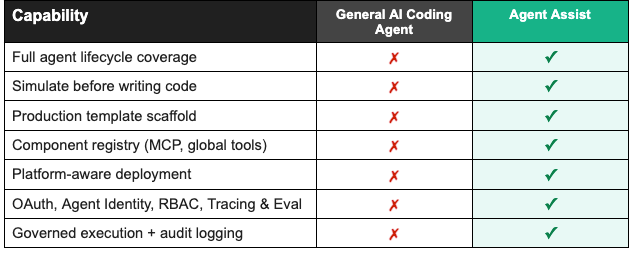
Why not just use a general-purpose coding agent?
General AI coding agents are built for breadth. That breadth is their strength, but it is exactly why they fall short for production AI agents.
Agent Assist was built for one thing: AI agents. That focus shapes every part of the tool. The design conversation, the spec format, the rehearsal system, the scaffolding, and the deployment are all purpose-built for how agents actually work. It understands tool definitions natively. It knows what a production-grade agent needs structurally before you tell it. It can simulate behavior because it was designed to think about agents end to end.
A comparison of DataRobot’s Agent Assist to generic AI coding tools
The agent building journey: from conversation to production
Step 1: Start designing your agent with a conversation
You open your terminal and run dr assist. No project setup, no config files, no templates to fill out. You’ll immediately get a prompt asking what you want to build.
Agent Assist asks follow-up questions, not only technical ones, but business ones too. What systems does it need access to? What does a good escalation look like versus an unnecessary one? How should it handle a frustrated customer differently from someone with a simple question?
Guided questions and prompts will help with building a complete picture of the logic, not just collecting a list of requirements. You can keep refining your ideas for the agent’s logic and behavior in the same conversation. Add a capability, change the escalation rules, adjust the tone. The context carries forward and everything updates automatically.
For developers who want fine-grained control, Agent Assist also provides configuration options for model selection, tool definitions, authentication setup, and integration configuration, all generated directly from the design conversation.
When the picture is complete, Agent Assist generates a full specification: system prompt, model selection, tool definitions, authentication setup, and integration configuration. Something a developer can build from and a business stakeholder can actually review before any code exists. From there, that spec becomes the input to the next step: running your agent in rehearsal mode, before a single line of implementation code is written.
Step 2: Watch your agent run before you build it
This is where Agent Assist does something no other tool does.
Before writing any implementation, it runs your agent in rehearsal mode. You describe a scenario and it executes tool calls against your actual requirements, showing you exactly how the agent would behave. You see every tool that fires, every API call that gets made, every decision the agent takes.
If the escalation logic is wrong, you catch it here. If a tool returns data in an unexpected format, you see it now instead of in production. You fix it in the conversation and run it again.
You validate the logic, the integrations, and the business rules all at once, and only move to code when the behavior is exactly what you want.
Step 3: The code that comes out is already production-ready
When you move to code generation, Agent Assist does not hand you a starting point. It hands you a foundation.
The agent you designed and simulated comes scaffolded with everything it needs to run in production, including OAuth authentication (no shared API keys), modular MCP server components, deployment configuration, monitoring, and testing frameworks. Out of the box, Agent Assist handles infrastructure that normally takes days to piece together.
The code is clean, documented, and follows standard patterns. You can take it and continue building in your preferred environment. But from the very first file, it is something you could show to a security team or hand off to ops without a disclaimer.
Step 4: Deploy from the same terminal you built in
When you are ready to ship, you stay in the same workflow. Agent Assist knows your environment, the models available to you, and what a valid deployment requires. It validates the configuration before touching anything.
One command. Any environment: on-prem, edge, cloud, or hybrid. Validated against your target environment’s security and model constraints. The same agent that helped you design and simulate also knows how to ship it.
What teams are saying about Agent Assist
“The hardest part of AI agent development is requirement definition, specifically bridging the gap between technical teams and domain experts. Agent Assist solves this interactively. A domain user can input a rough idea, and the tool actively guides them to flesh out the missing details. Because domain experts can immediately test and validate the outputs themselves, Agent Assist dramatically shortens the time from requirement scoping to actual agent implementation.”
The road ahead for Agent Assist
AI agents are becoming core business infrastructure, not experiments, and the tooling around them needs to catch up. The next phase of Agent Assist goes deeper on the parts that matter most once agents are running in production: richer tracing and evaluation so you can understand what your agent is actually doing, local experimentation so you can test changes without touching a live environment, and tighter integration with the broader ecosystem of tools your agents work with. The goal stays the same: less time debugging, more time shipping.
The hard part was never writing the code. It was everything around it: knowing what to build, validating it before it touched production, and trusting that what shipped would keep working. Agent Assist is built around that reality, and that is the direction it will keep moving in.
Get started with Agent Assist in 3 steps
Ready to ship your first production agent? Here’s all you need: