Unlocking UK house-building with AI-accelerated planning
UK government partners with Google DeepMind to build a new AI-powered prototype aimed at faster housing decisions.
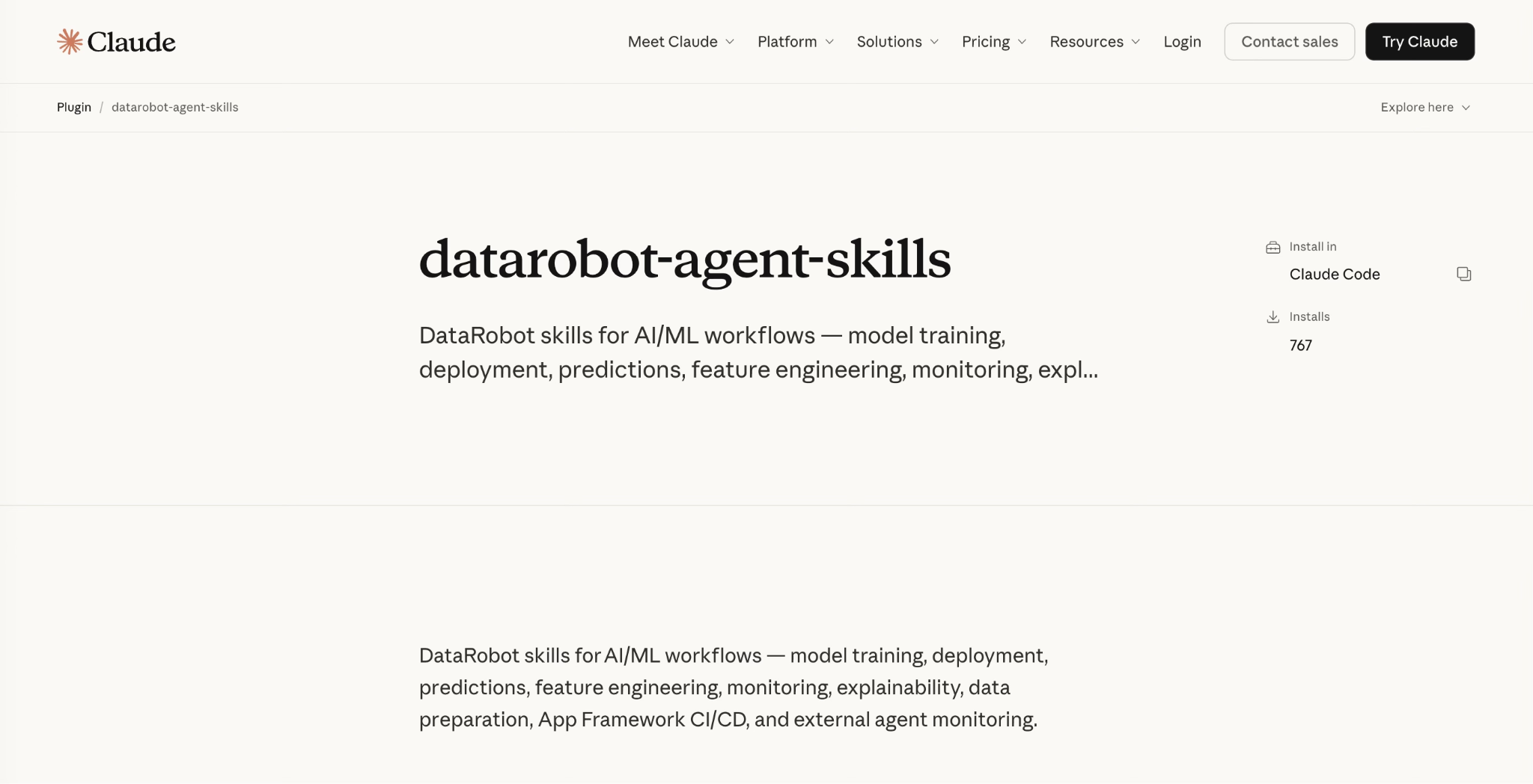
Claude Code is a genuinely good agent builder. You describe what you want, it reasons through the problem, picks tools, and ships working code. For greenfield projects against well-documented libraries, the experience is close to magic.
Where it gets harder is the same place every coding agent struggles: building on a specialized platform with its own deployment patterns, SDK conventions, and infrastructure abstractions. Claude doesn’t ship knowing your pyproject.toml layout, which endpoint to call for a real-time prediction, or how to wire Pulumi for a first production deploy. Without that context, you spend your time correcting hallucinated API calls instead of building. And none of that touches the harder enterprise question: once the agent works, how do you deploy it inside your governance boundary instead of on someone’s laptop?
DataRobot closes that gap from two directions, and Claude is on both sides of it. Claude is the default model in DataRobot Agent Assist, the design loop that turns an idea into a reviewable spec before any code exists. And the platform expertise of DataRobot ships as agent skills that install directly into Claude Code, so when Claude writes the implementation, it already knows the platform. Together they give you a path from agent idea to governed production deployment without the platform-specific guesswork in the middle.
The two surfaces are complementary, not redundant. One designs, while the other handles the build.
DataRobot Agent Assist (dr assist) | DataRobot skills in Claude Code | |
|---|---|---|
| What it is | An interactive design-to-deploy assistant, Claude Sonnet 4.5 by default via the LLM Gateway | Modular context packages (SKILL.md folders) that teach Claude Code the platform conventions of DataRobot |
| What it’s best at | Thinking through the spec, simulating tool calls, scaffolding from the Agentic Starter template | Writing the implementation against validated SDK and deployment patterns |
| Output | An agent_spec.md you can review with stakeholders, plus a scaffolded project | Correct, deployable code in your repo |
| When you reach for it | The start of a new agent, when intent is still fuzzy | Implementation and deployment, when you know what you’re building |
The handoff between them is the point. Agent Assist is strong at the part developers usually skip: deciding what the agent should do, which tools it needs, and how it should behave, before committing to code. It asks clarifying questions, writes an agent_spec.md in YAML, and simulates tool calls as a dress rehearsal so you can validate the design without hitting a live deployment. When the spec holds up, you hand the implementation to Claude Code, where the skills supply the platform context the spec assumes.
DataRobot skills ship as a Claude Code plugin. One command installs them:
claude plugin install datarobot-agent-skills@claude-plugins-officialEach skill is a self-contained folder with a SKILL.md file, YAML frontmatter that tells Claude when the skill applies, and helper scripts the agent can run directly. The set covers model training, deployment, predictions, feature engineering, monitoring, explainability, data preparation, and CI/CD for the app framework, with more added regularly.
Because skills are Agent Context Protocol definitions, the same repository works across Codex, Gemini CLI, Cursor, and others, but the plugin install above is the native path for Claude Code.
If you prefer the terminal, the universal installer does the same job:
npx ai-agent-skills install datarobot-oss/datarobot-agent-skills --agent claudeAgent Assist installs as a DataRobot CLI plugin and runs anywhere the DataRobot CLI is installed:
dr plugin install assistEvery platform team carries knowledge that exists nowhere in writing: the validation step that matters before the deployment call, the field whose absence is a warning rather than an error, the unwritten sequence everyone just knows. A human developer absorbs that judgment through repeated failure. An agent approaches your platform as a highly capable generalist armed only with the surface area you explicitly made available. If the correct sequence is only implied by the documentation, the agent infers its own. Then it improvises, confidently, and improvisation at enterprise scale is a different kind of risk than improvisation in a sandbox.
Skills close that gap by packaging operational judgment into task-scoped context an agent can act on. That also means they demand the discipline of code releases, not documentation updates. Wrong docs confuse one developer, who opens a support ticket. A wrong skill drives an agent to execute a broken workflow automatically, at scale, with total confidence. So DataRobot skills carry changelogs, CI that verifies them against the current platform API, and mandatory review before merging. When the platform evolves, the skills evolve through the same process you’d use for a breaking SDK change.
The measure of an agent-native platform is how much the agent needs to hallucinate. We’re working to get that number to zero.
In the Claude Code session below, we pointed the agent at a DataRobot account containing 130 datasets and 97 deployments accumulated over years of production AI work (forecasting systems, churn classifiers, GenAI deployments, MCP servers). Claude instantly read the feature schemas of 32 active deployments and the column names of 138 datasets.
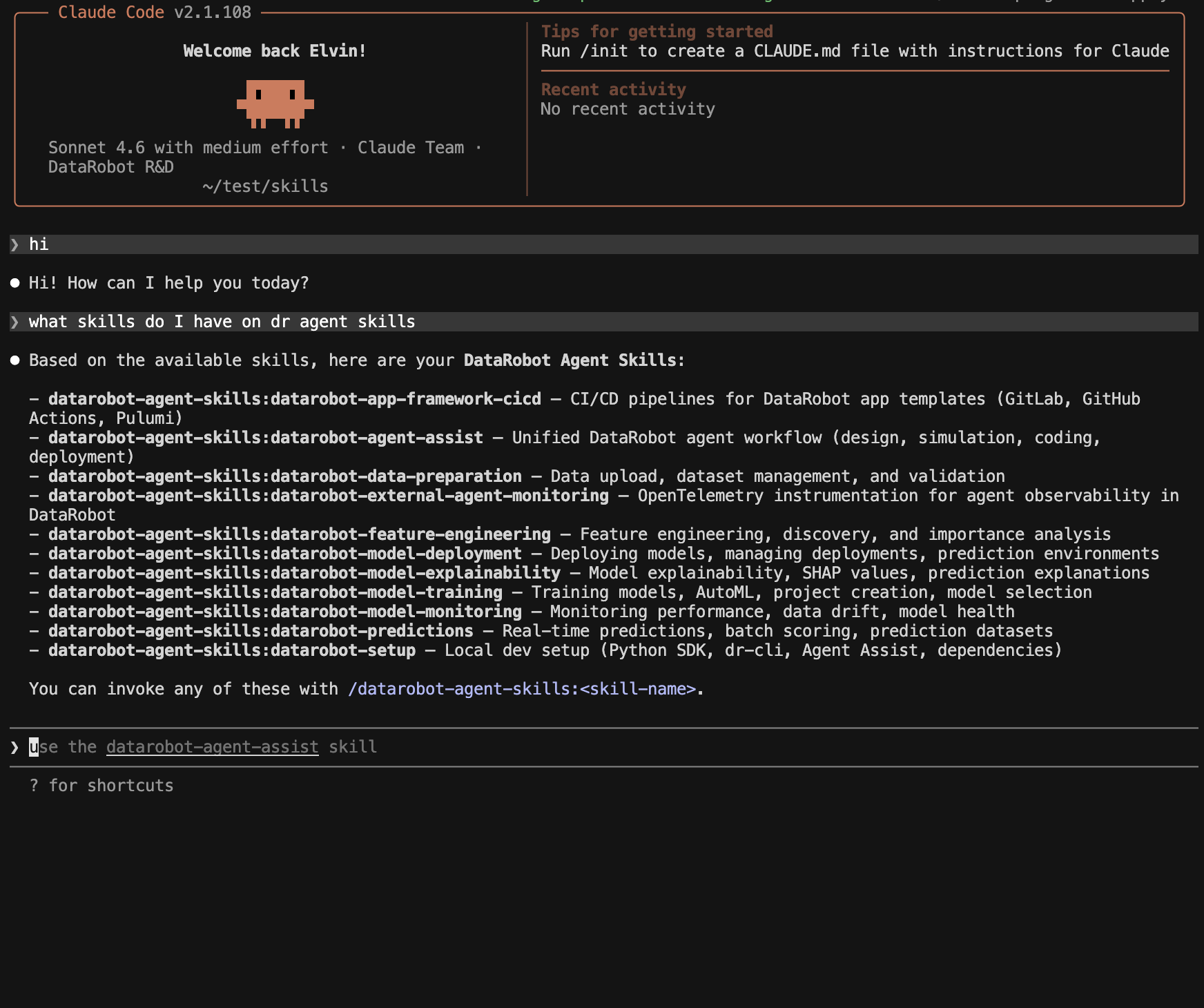
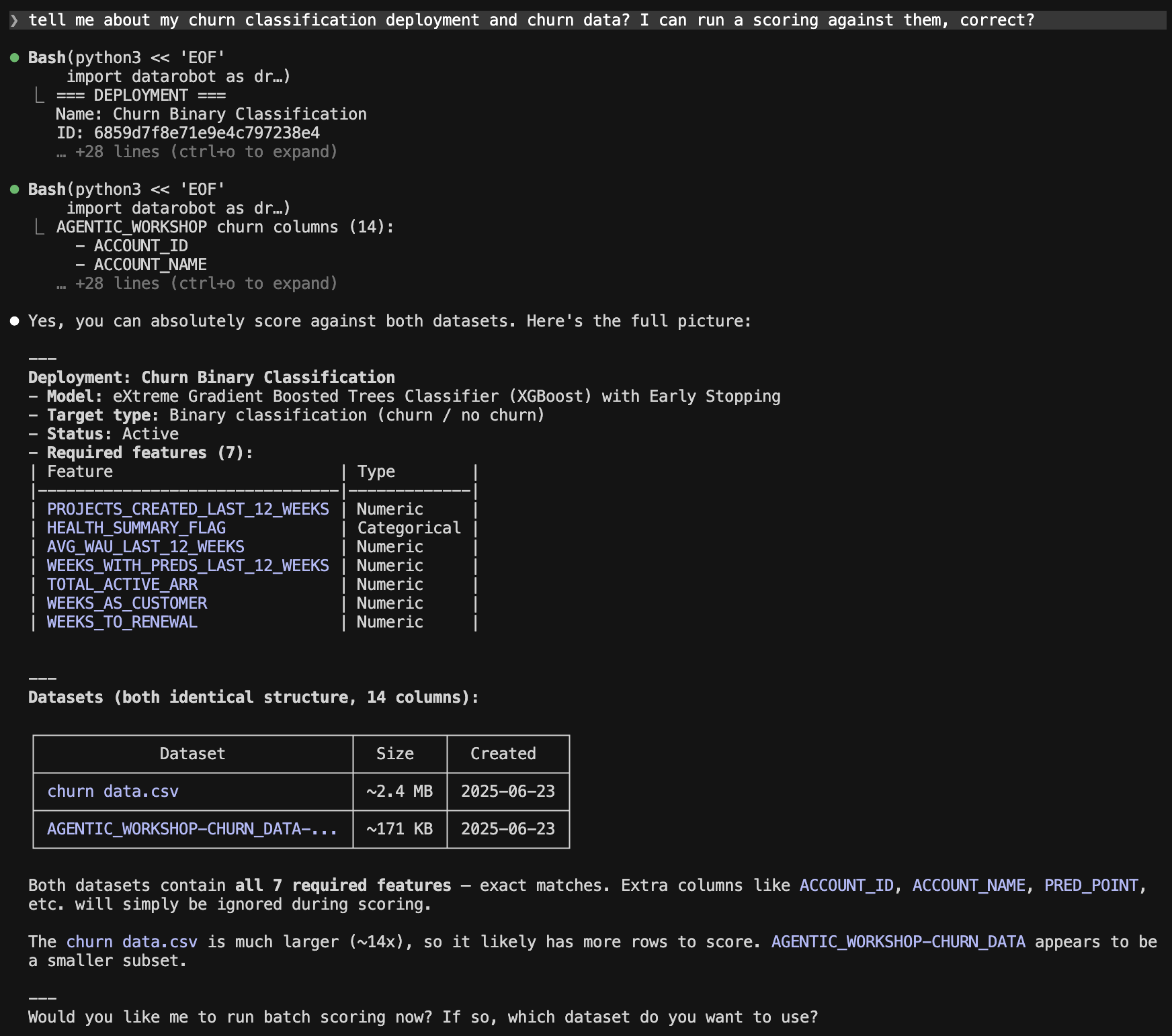
Notice the behavior. The skill instructed the agent to inspect the deployment schema first, understanding what the model expects before touching any data. The seven required features weren’t guessed; they were read from the live deployment. The confirmation that churn_data.csv was valid happened column by column. This is the structural validation agents usually skip when nothing enforces it. Here it ran silently, before the user even asked for a score.
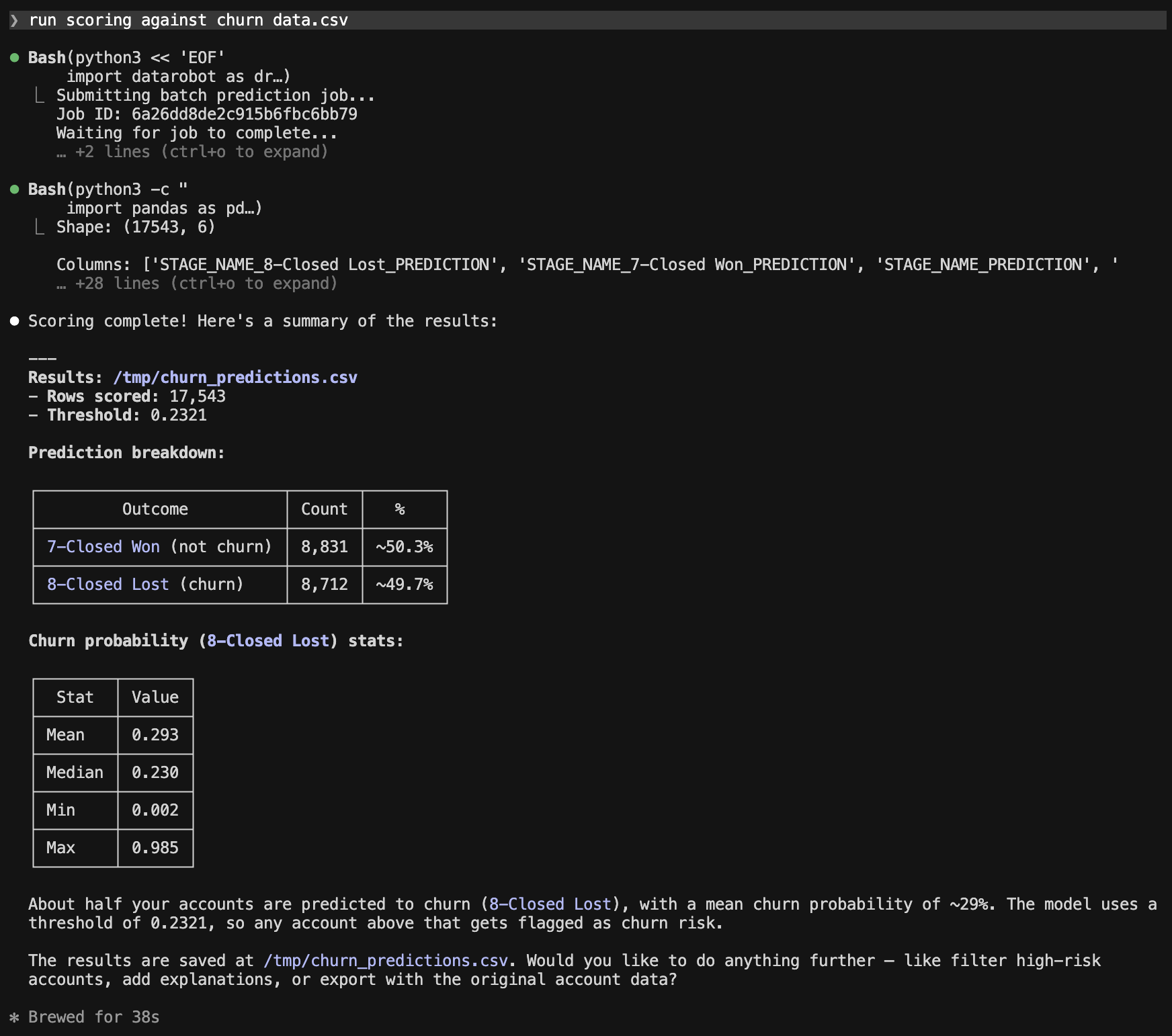
The live churn model ran against the customer dataset, the job completed, and the results landed locally. One follow-up prompt later:
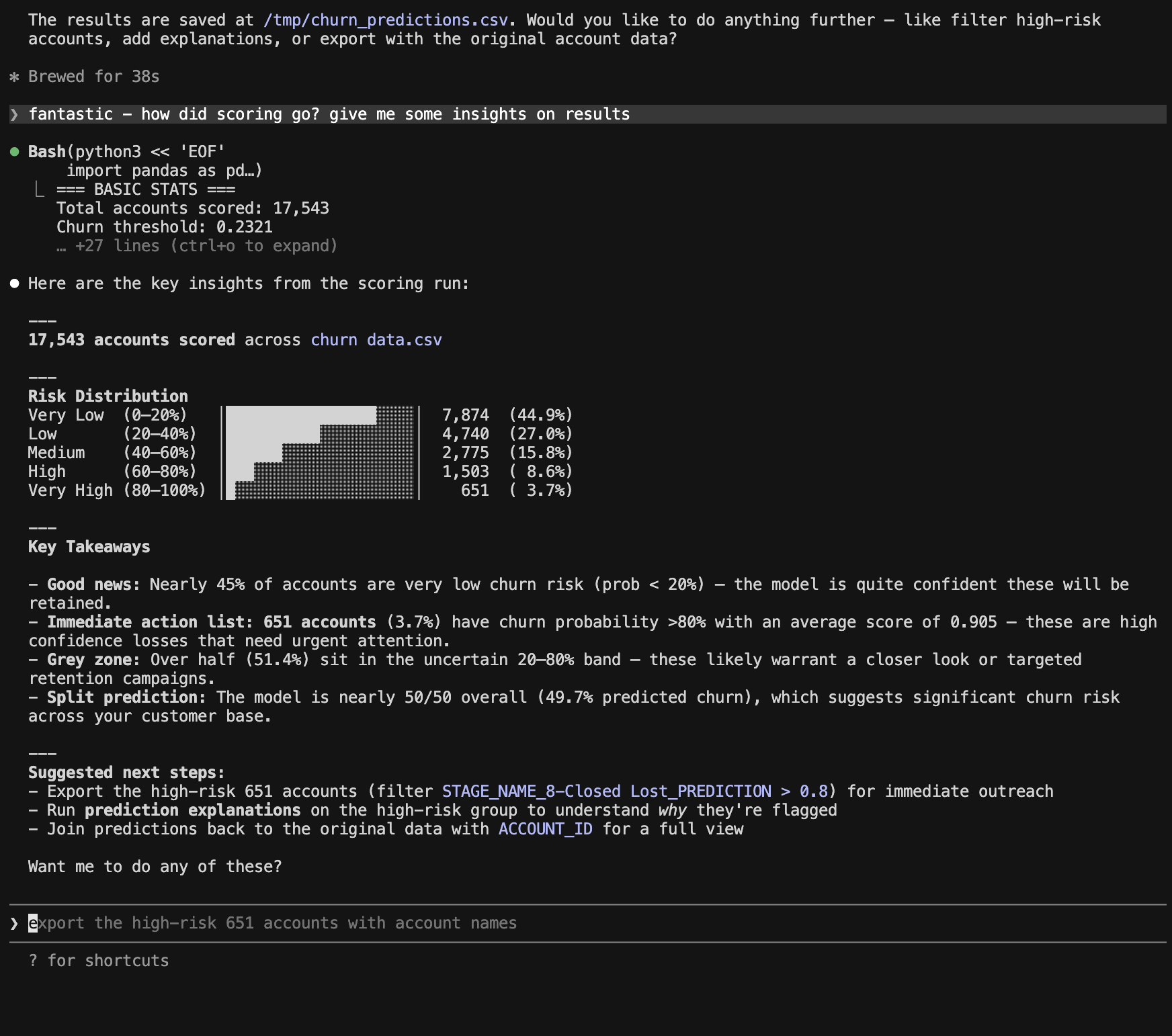
The 651 accounts at the top of that distribution carry an average churn probability of 0.905.
In a few minutes, we identified the customer accounts the retention team needs to act on. The skill made the workflow that produced that output reliable enough to trust. And the agent, without being asked, moved from “here are the results” to “here is what you do with them.”
That last step is worth pausing on. The skill encodes the prediction workflow and the agent interprets the output. The combination produces something neither would have produced alone: a complete path from raw dataset to prioritized business action, in a single conversational session, against a production environment with years of real complexity underneath it.
From the first question to the final outreach list: three prompts, one session, no documentation consulted, and no steps hallucinated.
That is what a teachable platform looks like: skills as SDKs.
Skills and templates give you a working application so you can spend your time on the decisions that are actually yours. Load prompts from the Prompt Management Registry by ID instead of hardcoding them. Configure LLM fallbacks early, because one provider outage shouldn’t take the agent offline. Attach a prompt injection guardrail, and add toxicity and PII guardrails before real users arrive. Require human approval for any tool with side effects. Stand up a golden dataset so you can tell whether a prompt change made the agent better or worse. None of these are unique to DataRobot; they’re what separates a deployed agent from a production agent. The difference is that the platform gives you the place to put them.
To keep it real: skills provide context, not magic. They won’t complete OAuth wiring for a third-party data source or guarantee a complex multi-integration agent works without iteration. What they eliminate is the class of errors that comes from a coding agent not knowing platform specifics: wrong endpoints, missing runtime parameters, incorrect dependency declarations, mixed local and deploy patterns. That’s where most developer time is lost on a new platform, and it’s the part this stack solves.
The gap between an agent prototype and an agent in production is mostly operational context. Claude writes the code. DataRobot supplies the context and the place to run it. Together, that’s the shortest credible path from an idea to a governed deployment.
The post The DataRobot platform as skills in Claude Code appeared first on DataRobot.

By Syl Kacapyr
Cornell engineers have developed a robotic collective that behaves less like a machine and more like a material that flows, reshapes and adapts to its environment without centralized control.
The system, called the Cross-Link Collective, consists of dozens of small robots that have limited mobility individually, but together exhibit coordinated and sustained motion. The research, published May 20 in Science Robotics, demonstrates a robotic system that resembles soft matter, continuously deforming and reorganizing as it moves, driven by what researchers call mechanical intelligence.
“Instead of relying on explicit computation and communication, the system shifts the intelligence into the shape of the robots and their physical interactions,” said corresponding author Kirstin Petersen, associate professor of electrical and computer engineering and the Aref and Manon Lahham Faculty Fellow in the Cornell Duffield College of Engineering. “We’re leveraging the contact dynamics to let useful behaviors emerge, so the system naturally settles into configurations that reduce internal stresses and improve motion.”
Each robotic module measures about 200 millimeters in length and 20 millimeters in width, and contains a small motor that drives it to oscillate between two shapes, an “I” and a “U.” These oscillations generate forces against the ground, allowing the modules to inch forward and jostle into one another. At each end of the module are weak Velcro patches, enabling them to temporarily latch and unlatch onto neighboring modules.
On their own, the modules move slowly and inefficiently. But when they entangle into chains, they begin to move collectively, self-organizing into shifting configurations that prove resilient in challenging environments.
“It doesn’t matter if one module has a compromised battery or fails for other reasons,” said lead author Danna Ma, visiting lecturer in electrical and computer engineering. “The system stays functional because it can adapt. It is redundant and doesn’t depend on any single module.”
Despite the minimal approach, the researchers showed that even a small amount of computation can improve system properties. To enhance cohesion, isolated modules emit an audible distress signal, prompting nearby modules to slow down and allow the straggler to reconnect.
“There is no centralized sensing or control,” Ma said. “Each module can infer when it has lost contact with the group by how much it’s being jostled and then use an audible buzz to slow down nearby modules while it catches up. It’s as simple as that.”
Co-authors at the Georgia Institute of Technology developed the original design of the module, which Petersen and Ma refined over years of experimentation and statistical analysis to improve its ability to entangle and operate in large numbers. That process revealed how even subtle changes in module size and other characteristics can influence how effectively they connect and move as a group.
The Cross-Link Collective draws inspiration from active gels – materials whose molecular links continually form and dissolve while maintaining overall structure. The findings could help inspire new forms of soft-matter engineering, though the researchers mostly see the system as a tool for studying how mechanical intelligence can give rise to resilient emergent behaviors in robot collectives.
“It’s helpful for us to start thinking about what we can encode into the physics of a system itself, as robots are increasingly applied to real-world scenarios that are highly unreliable and dynamic,” Petersen said. “Counterintuitively, by giving up exact control over configurations and coordination, we gain a surprising range of useful behaviors.”
As we enter 2026, AI-powered chatbots are evolving from simple automated tools to strategic business partners. Modern organizations are increasingly leveraging AI chatbots to streamline operations, enhance customer experience, and unlock new revenue streams.
With the market expected to surpass $10 billion in value in 2026, and a majority of enterprises embedding chatbots into core operations, AI‑driven conversational platforms are rapidly moving from optional to essential technology in business strategies.
For businesses aiming to accelerate digital transformation, understanding the latest AI chatbot development trends in 2026 is essential to stay competitive, agile, and customer-focused.
In this article, we share key insights and emerging trends in AI chatbot development, providing a roadmap for organizations aiming to optimize their operations and customer engagement in the coming year.
AI chatbots aren’t just a nice‑to‑have; they are central to digital transformation strategies worldwide:
Moreover, nearly half of all website customer interactions are managed by chatbots today, and 62% of consumers prefer chatbot support over waiting for a human agent.
AI chatbots are no longer just customer support tools. They reduce operational costs by automating repetitive interactions, provide 24/7 support, and deliver personalized experiences that foster customer loyalty.
Beyond customer service, chatbots are now integral in:
Modern chatbots powered by AI and advanced Natural Language Processing (NLP) can go beyond scripted answers, making them indispensable for enterprise efficiency and scalability.
Organizations that invest in next-generation chatbot technologies position themselves to transform not just how they interact with customers, but how they operate end-to-end.
Modern chatbots leverage advanced NLP models to deliver tailored recommendations, not generic scripts. This aligns with the fact that over 60% of consumers believe AI will change how they interact with companies, a key driver of personalization efforts.
Benefits:
Hyper-personalized chatbots act as trusted digital assistants, transforming both customer interactions and internal operations.
The future of chatbots is multimodal. While text-based chatbots remain common, audio and visual AI interfaces are on the rise, with voice integration becoming a standard feature in nearly half of new deployments and expected to grow further.
45% of new AI chatbot deployments already include voice capabilities, and this is expected to reach 78% by 2026 as voice and multimodal interactions become baseline expectations.
Voice interfaces powered by AI speech recognition and synthesis are becoming mainstream, especially on mobile and IoT devices. Businesses can deploy chatbots that switch effortlessly between text and voice, catering to user preferences and contexts.
In 2026, privacy expectations rank among the top concerns as chatbots penetrate new business functions, even as adoption grows.
As chatbots handle sensitive customer and operational data, security and privacy become paramount. Regulations like GDPR and CCPA require strict data protection, but beyond compliance, customers expect secure interactions.
USM advises businesses to partner with AI developers who prioritize privacy engineering and adopt federated learning or on-device AI models where data never leaves the user environment, minimizing breach risks while maintaining personalization.
AI chatbots will act as integrated nodes in business ecosystems. This means seamless interoperability with CRM, ERP, HR platforms, marketing automation tools, and supply chain management systems.
AI chatbots can now automate 40–60% of routine HR, IT helpdesk, and procurement tasks, cutting handling times by 70% and lowering staffing costs by up to 30%.
These integrations enable chatbots to perform sophisticated actions, from updating customer records and triggering workflows to initiating purchases or managing inventory alerts, all through conversational interfaces.
Such connectivity reduces manual work, accelerates response times, and enables proactive engagement based on live business data.
LLM‑powered chatbots such as generative AI systems will dominate ~82.7% of global chatbot usage, reflecting broad enterprise and consumer adoption.
Large Language Models (LLMs) like GPT‑class models empower chatbots to handle complex queries and natural conversation. These LLM‑enabled bots now power most leading enterprise conversions and customer interactions thanks to improved understanding and creative responses.
In 2026, chatbots powered by fine-tuned LLMs will serve as virtual advisors, knowledge bases, and even brand storytellers, delivering coherent, natural, and engaging conversations that build trust.
However, businesses must carefully manage LLM-powered chatbots’ use to avoid risks like misinformation or bias, implementing guardrails and human-in-the-loop systems for quality control.
Data-driven improvement is a core chatbot trend. Advanced analytics track interaction quality, customer satisfaction, conversion metrics, and bottlenecks. Using AI and analytics dashboards, chatbots continuously learn from conversations, feedback, and business outcomes to improve their accuracy and value.
USM encourages organizations to invest in chatbot platforms with built-in analytics dashboards and automated retraining capabilities. This enables rapid iteration and alignment with evolving business goals and customer needs.
Industries like healthcare, finance, and retail now deploy chatbots trained on domain expertise, not just basic NLP, providing relevant, compliant, and reliable support.
For example, healthcare chatbots will understand medical terminology, patient privacy laws, and clinical workflows. Financial services bots will be versed in regulatory compliance and risk assessments. These domain-aware chatbots provide more relevant, compliant, and effective support, driving deeper impact.
USM’s experience developing tailored AI solutions for diverse sectors highlights the power of domain expertise combined with cutting-edge AI.
Despite rapid AI advances, certain tasks require human judgment and empathy. Future chatbots will seamlessly escalate conversations to human agents with context, enabling hybrid workflows that combine AI efficiency with human insight.
This collaboration enhances customer experience, reduces resolution time, and optimizes workforce allocation. In 2026, businesses will implement intelligent routing, agent assist tools, and unified communication platforms that empower human-AI teams.
For organizations across industries embarking on digital transformation, integrating advanced chatbots requires a thoughtful, phased approach:
Start by identifying the specific operational challenges and customer experience goals your chatbot must address. Whether it’s reducing call center volume, improving sales conversions, or automating internal workflows, clear KPIs guide development and measurement.
Choose chatbot frameworks that support multimodal interaction, LLM integration, robust analytics, and easy system integration. Cloud-native, API-first platforms enable agility and future-proofing.
Effective AI depends on clean, relevant data. Implement data governance policies and ensure privacy compliance from day one. Consider privacy-preserving AI techniques to build customer trust.
Deploy chatbots in controlled environments to gather user feedback, test integrations, and tune AI models. Use analytics to refine conversation flows and improve performance rapidly.
Plan for seamless escalation paths and equip your workforce with AI-powered tools. Empower agents with real-time insights to deliver better service.
Treat chatbots as evolving assets. Use conversation data and performance metrics to retrain models, update knowledge bases, and adapt to changing customer needs.
Integrating AI chatbots in 2026 isn’t just a tech upgrade; it’s a strategic business leap. With real business data on adoption rates, market growth, ROI, and customer preference, your article now has the credibility and relevance to rank higher, engage executives, and convert decision‑makers.
At USM, we provide tailored AI chatbot solutions that scale with your needs and deliver measurable ROI. Businesses adopting these trends can gain significant competitive advantages and lead in the next era of digital transformation. Book Executive AI Briefing
ChatGPT- competitor Anthropic has shut-down access to its newest AI – Claude Fable 5 – on U.S. government fears the software will be used by hackers to exploit software vulnerabilities.

The AI engine, released last week, is based on Anthropic Mythos – advanced AI that Anthropic has essentially self-quarantined from public use, due to the same fears over cybersecurity.
Anthropic designed Fable 5 to refrain from exposing vulnerabilities in everyday software. But U.S. government security pros found a workaround to supersede the safeguard.
In other news and analysis on AI writing:
*Still Unpatched: 86% of Software Vulnerabilities Found by Anthropic Mythos: After more than two months of testing by top software and cybersecurity firms, only a handful of security vulnerabilities exposed by new AI model Anthropic Mythos have actually been fixed.
During that time, testing and use of Mythos has been limited to about 200 software makers and cybersecurity companies – Project Glasswing — who are attempting to plug the ever-expanding array of security holes Mythos is finding in everyday software.
*ChatGPT Competitor Embeds AI Engineers in U.S. National Security Agency (NSA): About a half dozen AI engineers from Anthropic are now working within the NSA.
Their mission: Help protect the U.S. against adversaries coming at the country with weaponized AI — as well as help customize AI for specific NSA applications.
Included on the menu: Offensive use of AI. Observes writer Matt Novak: “The National Security Agency (NSA) is using Anthropic’s Mythos AI model for offensive cyber operations — likely against China and Iran.”
*Claude Fable 5: Next Gen AI Software You Can’t Use: AI expert Ethan Mollick reports that Fable 5 – a new AI engine currently banned by the U.S. due to security concerns – is a major upgrade in AI waiting-to-happen.
Observes Mollick: “My conclusion is that it represents a very real leap over every model I have used before — and maybe more important — suggests our relationship with AI is changing in drastic ways.
“In experiment-after-experiment I conducted, it outperformed basically every other public model I have used — by a considerable margin.”
*Increasing Number of Businesses Settling for ‘Nearly as Good AI:’ Spooked by what they see as sky-high prices for bleeding-edge AI, many companies are opting for AI that is nearly as good – at greatly reduced prices.
Observes AI expert Brian Armstrong: “Demand for intelligence is near infinite – but 80% of workloads will be running on 99% cheaper models within 12-18 months.”
Most of those models – including DeepSeek – can be found on the OpenSource market.
*Consumers Grin: Google Slashes AI Pricing Again: Google has cut the cost of AI Plus – a ‘lite’ version of its $20/month subscription — to $4.99.
The move is ironic, given that AI Plus – rolled-out less than a year ago – was supposed to be Google’s rock-bottom pricing offering to AI users who wanted something more than a free subscription.
Lead writer Lucas Ropek indicates the slashed pricing could be the start of wholesale pricing cuts from all the major AI titans, including OpenAI – maker of ChatGPT – Anthropic, Microsoft and others.
*Apple Out with a Fresh Round of AI Promises: Apple is out with yet another upgrade to its ‘Apple Intelligence,’ which it says will turbo-charge apps across its ecosystem with enhanced AI.
With the move, the company is hoping to reverse the impact of its promised roll-out of the last generation of Apple Intelligence, which landed with a thud last year.
Observes Craig Federighi, senior vice president, software engineering: “With useful features for browsing the Web, expressing creativity, editing photos — and so much more — today marks a big step forward on our journey to integrate powerful AI into the core of our platforms.”
*Google’s Research Tool NotebookLM Gets Another Upgrade: Google is out with an enhanced version of NotebookLM, a robust research tool that combines AI creativity, analysis andwriting with in-depth Web research.
Key features of the upgrade:
*NotebookLM now runs on Gemini 3.5, Google’s flagship AI
*Enhanced document analysis
*Enhanced Web research and source discovery
*Snapshot: Top Ten Tools for AI Writing: Memeburn is out with its list of the top ten tools for AI writing, based on intended use.
ChatGPT is rated best for all-around text generation, while Anthropic is considered tops for long-form and nuanced writing.
Plus there are other ‘best of’ tools featured in the review if you’re looking to do marketing writing, SEO-optimized writing, email writing and more.
*AI BIG PICTURE: Journalists Who Train Their AI Replacements: Writer Gretel Kahn takes a look at four journalists in this piece who are essentially training AI as their replacement.
Observes Khaleda Khan, one journalist who helped train AI to do journalism at xAI: “While I was working there, I was thinking, ‘Am I helping make something that will replace me?’ I still wonder about this.”
After working for xAI for six months, Khan got the answer: xAI decided not to renew Kahn’s contract.

Share a Link: Please consider sharing a link to https://RobotWritersAI.com from your blog, social media post, publication or emails. More links leading to RobotWritersAI.com helps everyone interested in AI-generated writing.

–Joe Dysart is editor of RobotWritersAI.com and a tech journalist with 20+ years experience. His work has appeared in 150+ publications, including The New York Times and the Financial Times of London.
The post Cybersecurity Nightmare: U.S. Bars Access to New AI appeared first on Robot Writers AI.
Cursor has changed how developers write code. The agent mode is good: you describe what you want, it reasons through the problem, picks the right tools, and ships working code. For greenfield projects and standard libraries, it works smoothly.
Where it gets harder is when you’re building agents on a specialized platform with its own deployment patterns, SDK conventions, and infrastructure abstractions. Cursor is a fast learner, but it doesn’t ship knowing your platform’s pyproject.toml structure, which endpoints to use for different agent execution patterns, or how to wire up Pulumi for a first production deployment. Without that context, you end up correcting hallucinated API calls and debugging configuration errors that have nothing to do with your actual use case.
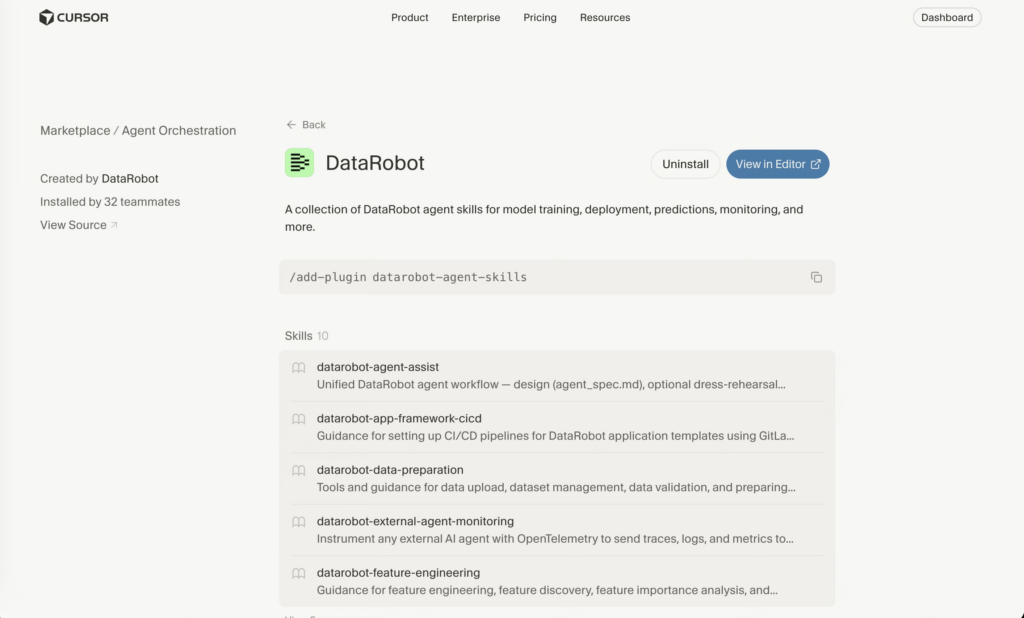
DataRobot solves this with agentic Skills: modular context packages that give Cursor exactly what it needs to build, deploy, and govern production AI agents on the DataRobot platform. Install them once. Cursor handles the rest. You can go from empty repo to a governed, production AI agent without leaving Cursor.
This post walks through what Skills are, how to get them into Cursor in under two minutes, and how to build and deploy a production-ready agent with them.
A DataRobot Skill is a self-contained folder containing a SKILL.md file with YAML frontmatter, plus any helper scripts the agent can run directly. When Cursor loads a Skill, it gains specific, validated guidance for that capability area: model training, deployment, predictions, monitoring, feature engineering, or CI/CD setup for the app framework.
The design goal is intentional: rather than dumping everything into a monolithic system prompt and overwhelming your agent’s context window, Skills are modular. You load what you need for the task at hand.
All DataRobot Skills follow the naming convention datarobot-<category>. The full set currently available:
| Skill | What It Covers |
|---|---|
datarobot-agent-assist | Unified DataRobot agent workflow — design (agent_spec.md), optional dress-rehearsal simulation via built-in rehearsal engine, template-based coding, and deployment. |
datarobot-model-training | AutoML project creation, training configuration, model management |
datarobot-model-deployment | Deploying models, configuring prediction environments |
datarobot-predictions | Batch scoring, real-time predictions, prediction dataset templates |
datarobot-feature-engineering | Feature discovery, importance analysis, engineering guidance |
datarobot-model-monitoring | Data drift tracking, model health, performance monitoring |
datarobot-model-explainability | SHAP values, prediction explanations, diagnostics |
datarobot-data-preparation | Data upload, dataset management, validation |
datarobot-app-framework-cicd | CI/CD pipelines, Pulumi infrastructure-as-code for agent templates |
datarobot-external-agent-monitoring | OpenTelemetry instrumentation to route traces and metrics to DataRobot |
Skills are Agent Context Protocol (ACP) definitions, which means they work beyond Cursor too. The same repository is compatible with Claude Code, OpenAI Codex, Gemini CLI, VS Code Copilot, and others.
DataRobot Skills are available on the Cursor Marketplace at cursor.com/marketplace/datarobot.
Option 1: One command from the Cursor command palette
Open Cursor’s command palette and run:
/add-plugin datarobot-agent-skills
This registers the full DataRobot Skills repository against your Cursor install. No configuration required. Cursor reads the AGENTS.md file automatically and makes all skills available on demand.
Option 2: Universal installer via npx
If you prefer to install from the terminal and copy Skills directly into your project repo:
# Install all skills
npx ai-agent-skills install datarobot-oss/datarobot-agent-skills

# Install a specific skill only
npx ai-agent-skills install datarobot-oss/datarobot-agent-skills/datarobot-predictions

# Install for Cursor specifically
npx ai-agent-skills install datarobot-oss/datarobot-agent-skills --agent cursor
Verify installation
Open the Cursor AI chat panel (Cmd/Ctrl + L) and ask:
What DataRobot Skills are available?If Skills are loaded, Cursor will list them. If you get a blank response, check that the repository is open as your workspace and that AGENTS.md is at the root.
Here’s a concrete example to show how Skills change the experience in practice. We’ll build and deploy a customer-facing support agent that uses the DataRobot LLM gateway, connects to an existing model deployment as a tool, and ships as a production application via the DataRobot app framework.
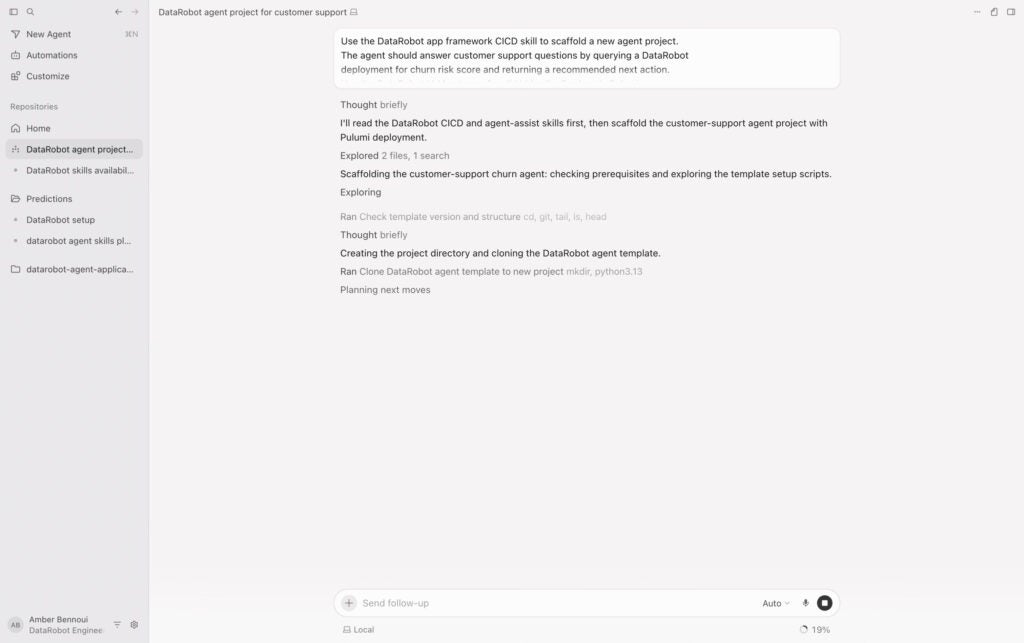
Start from an empty project repo. Open Cursor Agent mode and give it a clear task prompt that references the Skills you want it to use:
Use the DataRobot app framework CICD Skill to scaffold a new agent project. The agent should answer customer support questions by querying a DataRobot deployment for churn risk score and returning a recommended next action. Use the DataRobot LLM gateway for all LLM calls. Deploy via Pulumi.With the datarobot-app-framework-cicd Skill loaded, Cursor generates a project that follows the correct DataRobot template structure: the right pyproject.toml layout, a properly configured agent bundle, LLM gateway enabled by default, and Pulumi infrastructure-as-code for deployment. Without the Skills this is where agents typically go sideways — wrong dependency declarations, missing runtime parameter injections, or a template structure that silently breaks on first deploy.
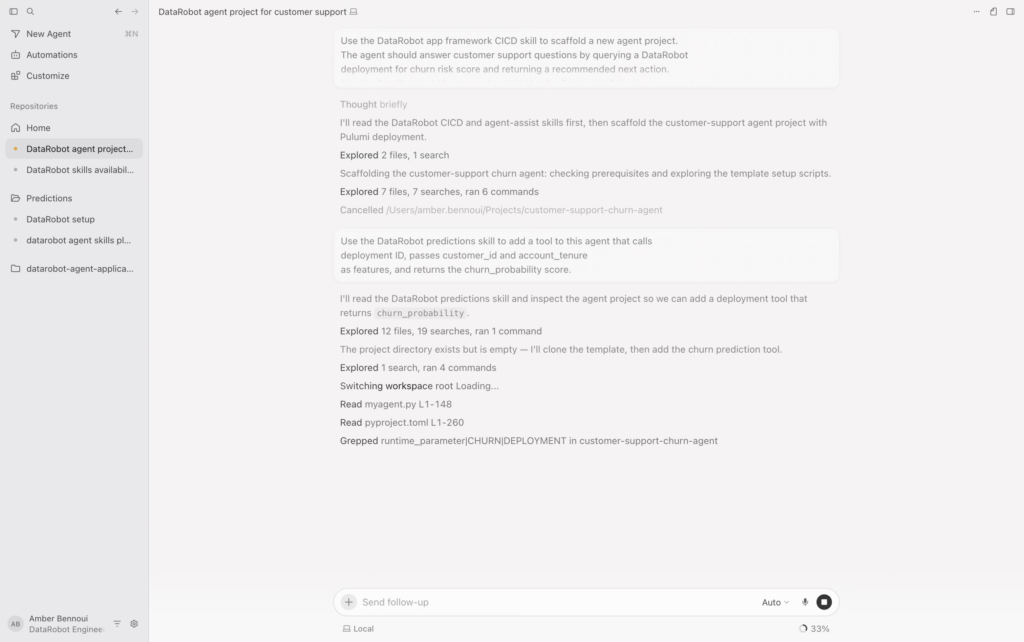
Now add the prediction tool that gives the agent something to reason over:
Use the DataRobot predictions Skill to add a tool to this agent that calls deployment ID, passes customer_id and account_tenure as features, and returns the churn_probability score.
The datarobot-predictions Skill gives Cursor the validated SDK patterns for real-time prediction calls, including how to structure the feature payload, handle the response schema, and surface prediction explanations if you want the agent to justify its recommendation. Cursor pulls in the relevant helper scripts from the Skill’s scripts/ directory rather than writing its own endpoint logic from scratch.
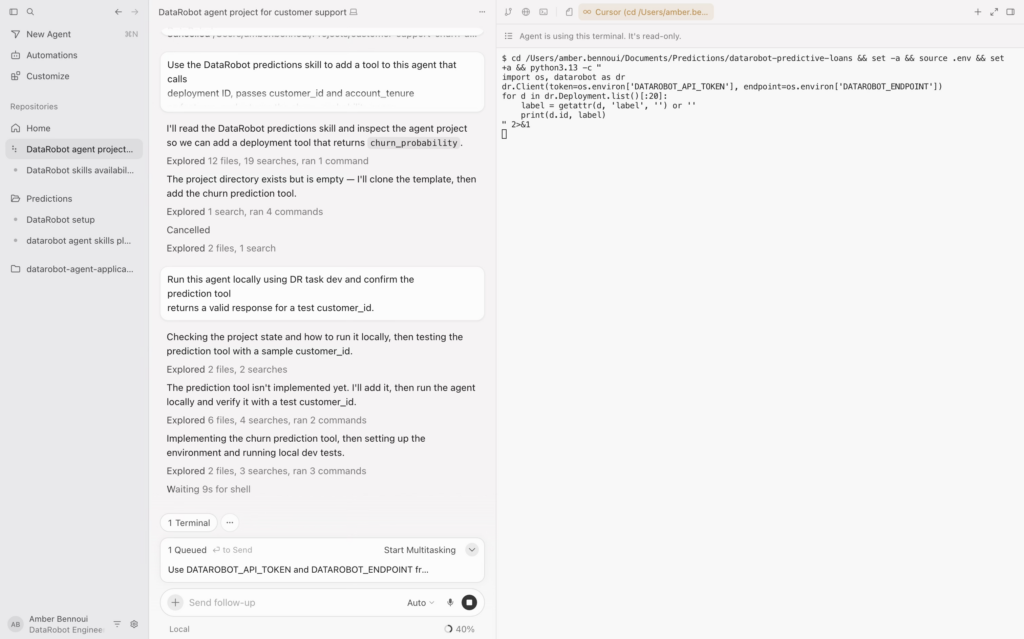
Before deploying, run the agent locally using DataRobot task dev tooling:
Run this agent locally using DR task dev and confirm the prediction tool returns a valid response for a test customer_id.The Skills include guidance on the dr task CLI commands and common local testing patterns. If you hit authentication issues, answer Cursor’s follow-up:
Use DATAROBOT_API_TOKEN and DATAROBOT_ENDPOINT from environment variables.Once local testing passes, deploy:
Use the DataRobot app framework CICD Skill to deploy this agent to production using Pulumi. Create a new stack named customer-support-agent.Cursor generates the correct pulumi up sequence, configures the deployment with the right server type and credential handling, and wires the application to your DataRobot use case. First deploys typically take 10 to 20 minutes as Pulumi provisions the full stack. Subsequent updates are faster. When it completes, you’ll have a registered model, an agent deployment, and a live application endpoint in your DataRobot workbench.
Skills provide context. They don’t handle OAuth flows for third-party integrations, auto-configure your Pulumi stack on first deploy, or guarantee that a complex multi-integration agent will work end-to-end without iteration. First deployments via Pulumi can take 10 to 20 minutes, and the OAuth wiring for Google Workspace or Salesforce data sources still requires manual setup in DataRobot.
Where Skills are invaluable is in eliminating the class of errors that come from Cursor not knowing platform specifics: wrong API endpoints, missing runtime parameter injections, incorrect dependency declarations in pyproject.toml, mixing task dev and task deploy patterns incorrectly. That class of error is where most developer time is lost when building on a new platform.
Install the plugin in one command:
/add-plugin datarobot-agent-skillsBrowse the full skill set and source at github.com/datarobot-oss/datarobot-agent-skills.
If your team builds custom workflows that don’t map cleanly to the existing Skills, the repository accepts contributions. A custom skill is just a SKILL.md file with YAML frontmatter, a clear description, and whatever helper scripts your workflow needs. Point Cursor at it and the convention handles the rest.
The gap between “agent prototype” and “agent in production” is mostly operational context. Skills are how DataRobot answers that gap.
The post Build with Cursor and deploy production-ready AI agents on DataRobot appeared first on DataRobot.