Over the past few decades, roboticists worldwide have introduced increasingly advanced robots that can understand human instructions, move in their surroundings and reliably complete basic manual tasks. While they perform well in some scenarios, many of these robots still struggle to translate the instructions of users into precise and executable actions that would allow them to successfully complete desired tasks.
Autonomous robots can perform tasks with limited human intervention, while Physical AI gives machines the ability to understand their environment, make decisions, and interact with the physical world more effectively.
Claire chatted to Josie Hughes from École Polytechnique Fédérale de Lausanne about using AI to develop new designs for robotic manipulators.
Josie Hughes is an Assistant Professor at EPFL, where she established the CREATE Lab in 2021. She completed her PhD in the Bio-inspired Robotics Lab at the University of Cambridge, examining the role of passivity in bio-inspired manipulators. Her research focuses on developing novel design paradigms for designing robot structures that exploit their physicality and interactions with the environment. This includes the development of robotic hands, soft manipulators, and automation systems for applications focused on sustainability and science.
The hardest part of building against a new platform is teaching your tools about it. Your coding agent doesn’t know the SDK’s conventions. Your IDE doesn’t know the CLI commands. Your terminal doesn’t know the auth pattern. Every gap is a context switch, and every context switch is time spent away from the work. DataRobot Skills close those gaps inside the tools you already use. Our marketplace listings in Anthropic, Gemini and Cursor close them at the install step.
What are Skills?
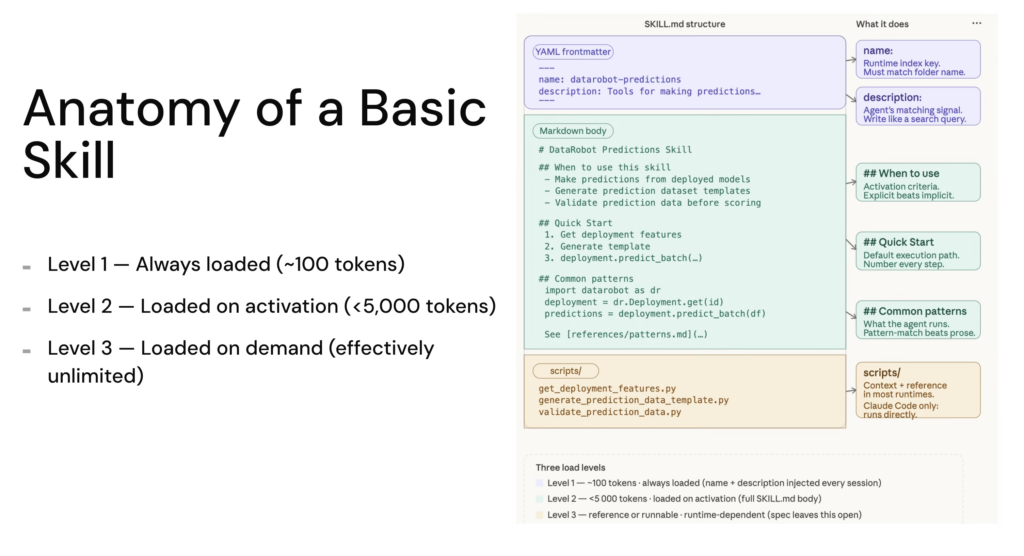
A Skill is a folder with a SKILL.md file. The frontmatter tells the agent when the skill applies. The body tells it how to do the work. The agent loads only the skills relevant to the current task, so context stays clean and reasoning stays sharp.
DataRobot Skills are Agent Context Protocol definitions. They work across Claude Code, Cursor, Codex, Gemini CLI, Amp, VS Code Copilot, Goose, Letta, Kilo Code, and OpenCode. They are not slash commands and not MCP tools. They are the procedural knowledge your agent needs to use the SDK, the CLI, and the platform correctly, every time.
The point of the marketplace listings is to remove the install step entirely so developers find DataRobot at the moment they’re picking tools, not after they’ve already committed to a workflow.
The repo currently ships 10+ official Skills, with new Skills being added every week. Each one corresponds to a core part of the DataRobot agent building workflow.
Skill
What it teaches the agent
datarobot-setup
The on-ramp. Installs the DataRobot CLI, Python SDK and Agent Assist, configures the endpoint and API key, and verifies connectivity. Run this first and you don’t need to worry about a single thing around setup.
datarobot-agent-assist
The full agent lifecycle. Generates agent_spec.md from a guided design conversation, rehearses tool calls before any code is written, scaffolds against the Agentic Starter template, runs local tests, and deploys to the DataRobot platform.
Performance and data drift monitoring, accuracy tracking, alert configuration.
datarobot-model-explainability
Prediction explanations, feature impact, model diagnostics.
datarobot-data-preparation
Dataset upload, validation, schema checks, and registry workflows.
datarobot-app-framework-cicd
CI/CD pipelines for DataRobot application templates.
datarobot-external-agent-monitoring
OpenTelemetry instrumentation for external agents reporting into DataRobot.
Two of these change the experience the most. datarobot-setup is the on-ramp: before it existed, a developer who installed the Skills still had to manually authenticate, point the SDK at the right base URL, and confirm everything was wired up. Now the setup phase becomes another thing the agent does, not another thing the developer does.
datarobot-agent-assist brings the spec-driven design loop into the same context. Instead of switching to a different tool to design an agent, the developer asks for help, the skill activates, and dr assist runs from inside the same IDE conversation, producing an agent_spec.md and rehearsing the tool calls before any code is written. Design, test and deploy, all inside the agent loop.
How to install DataRobot Skills
Cursor
Open the Cursor marketplace entry for DataRobot, click the “Add to Cursor” button, and Cursor handles the rest. The Skills register against the workspace and become available in any chat. If you’d rather pin to the repo and version-control the install, open the repo as your workspace and Cursor reads AGENTS.md automatically.
Gemini CLI
Gemini CLI now treats DataRobot as an extension with bundled Skills. From your terminal:
The Skills land in ~/.gemini/extensions/datarobot-agent-skills/skills and load on session start. Use /skills list inside a Gemini session to confirm. Environment variables propagate automatically.
Claude Plugins
For Claude users, DataRobot Skills are available through the plugin marketplace listing and you can run this command:
claude plugin install datarobot-agent-skills@claude-plugins-official
Universal Instructions
The universal installer is the answer if you are running an AI IDE or CLI not listed above:
The marketplace listings are the first step in distributing DataRobot’s developer surface the same way modern infrastructure tools distribute theirs. Expect the catalog to grow: more skills around the agent lifecycle, more bundled flows for Agent Assist, deeper coverage of governance and observability patterns that today live in docs rather than in agent context.
If you want to see what’s there now or contribute a pattern your team uses, the source of truth is the repo: github.com/datarobot-oss/datarobot-agent-skills. The marketplace listings track it.
The developer experience DataRobot is building is one where the platform shows up in the surface you already chose, with the on-ramp baked in. Skills are how that promise reaches the agent in your IDE. The marketplaces are how it reaches you.
Cornell engineers have developed a robotic collective that behaves less like a machine and more like a material that flows, reshapes, and adapts to its environment without centralized control. The system, called the Cross-Link Collective, consists of dozens of small robots that have limited mobility individually, but together exhibit coordinated and sustained motion.
Only by combining radar and vision with edge AI processing in one unit could we deliver a system fast enough, reliable enough and robust enough to meet the demands of next-generation autonomy.
Even advanced technology can struggle when the real world becomes unpredictable. In April 2026, a Waymo robotaxi in San Antonio, Texas, drove into a flooded lane during severe weather, prompting the company to recall about 3,800 vehicles for a software fix.
The recently launched Robotics Café is a weekly online seminar series to bring together researchers, students and industry practitioners working in the field of autonomous robotics. One of the key aims of the initiative is to provide a dedicated platform for students to present and disseminate their work, enabling broader visibility and impact across academia and industry.
Organised by P.B. Sujit (IISER Bhopal), Sandeep Manjanna (Plaksha University) and Aditya Paranjape (Monash University), the talks take place every Thursday from 17:00-18:00 Indian Standard Time. The link to watch the presentations live via Google Meet is here. Alternatively, you can catch the recordings on the Robotics Café YouTube channel.
The series kicked off with a talk from Professor Debasish Ghose (Indian Institute of Science) entitled: AERObotics: The Art of Catching Objects in the Air. The presentation explored the fascinating intersection of guidance theory and aerial robotics.
In the second lecture, Professor Arun Kumar Singh (University of Tartu) spoke about leveraging predictive uncertainty for model-based planning and control.
The emerging circular economy introduces new challenges and new application areas for automation. One of them is EV battery disassembly. Unlike traditional industrial environments, battery disassembly operates without stable geometries, consistent designs, or reliable data.
The emerging circular economy introduces new challenges and new application areas for automation. One of them is EV battery disassembly. Unlike traditional industrial environments, battery disassembly operates without stable geometries, consistent designs, or reliable data.
Imagine navigating a city street during rush hour—cars and bikes zipping by, pedestrians hustling down a crowded sidewalk, your eyes adjusting to the shop windows' glare in one moment and a dark underpass the next. Our brain, of course, does all this without us being aware of the complex processes going on in that moment. In real time, our eyes and brain create a three-dimensional, accurate representation of a dynamic scene, constantly calculating distances between objects with myriad shapes, sizes, and surfaces.
In the aftermath of a devastating earthquake, unpiloted aerial vehicles (UAVs) could fly through a collapsed building to map the scene, giving rescuers information they need to quickly reach survivors. But this remains an extremely challenging problem for an autonomous robot, which would need to swiftly adjust its trajectory to avoid sudden obstacles while staying on course.
If I’ve learned anything in my decades covering the tech industry, it’s that we have a pathological obsession with “the engine.” In the 90s, we obsessed over clock speeds while our software crashed. In the 2000s, we obsessed over browser […]
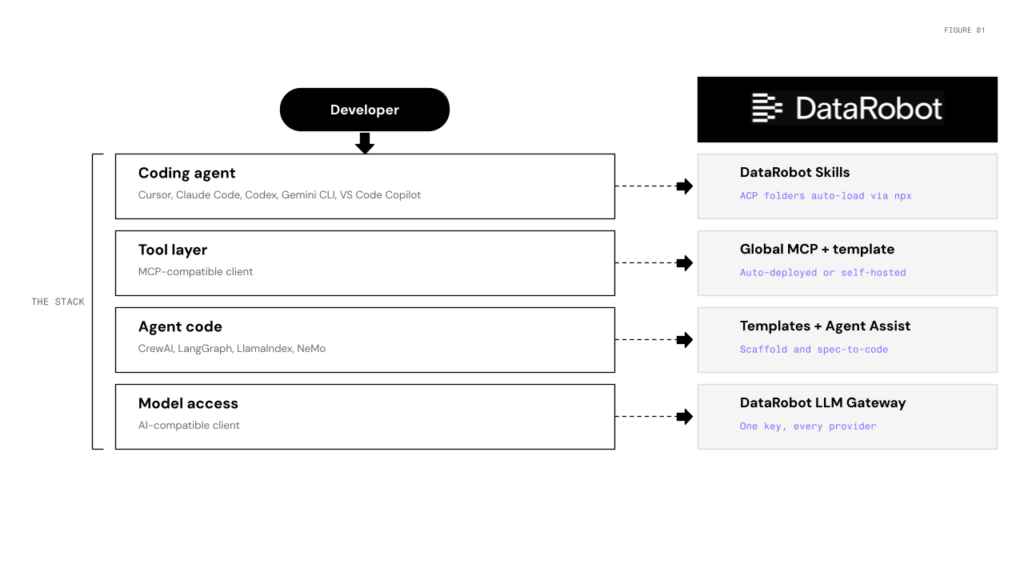
You shouldn’t have to leave Cursor to build, deploy, or monitor a production-grade agent. You can wire together LangChain, a vector DB, a monitoring tool, and a deployment pipeline yourself, but you’ll spend more time on that plumbing than on the agent itself. DataRobot is the shortcut. It now lives where you build, integrating directly into your IDE across the coding agent, tool layer, and model gateway.
Picture what this unlocks. A platform engineer at a fintech company wires up the Global MCP, points their existing LangGraph agent at it, and ships a governed deployment with monitoring and tracing all before lunch, without touching their agent code.
DataRobot is the pathway to that workflow. Four pieces, one per layer of the stack:
image
Skills: drop DataRobot expertise into any coding agent
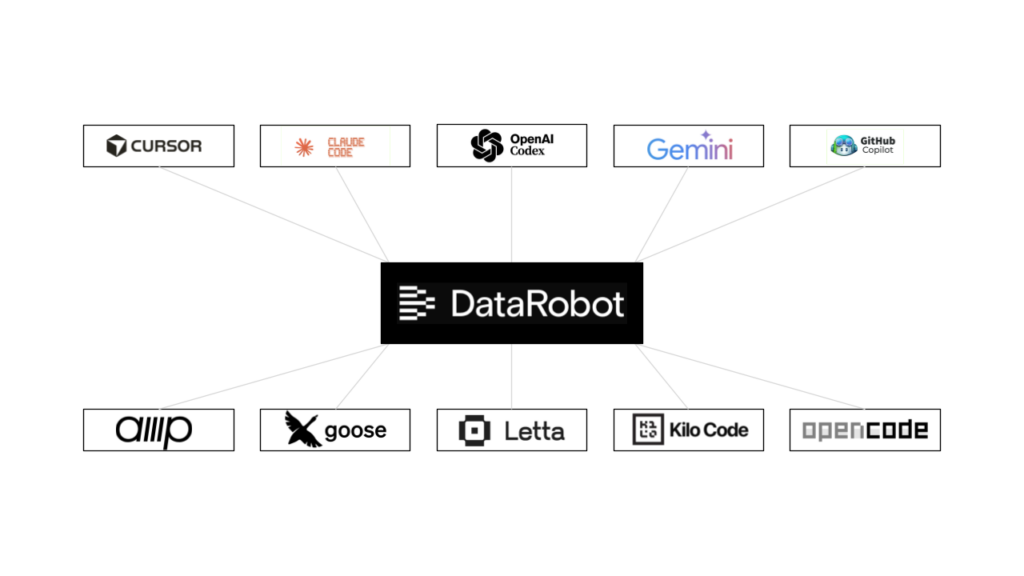
datarobot-agent-skills ships Agent Context Protocol folders for the things developers ask DataRobot to do: model training, predictions, deployment, feature engineering, monitoring, explainability, data prep. One install reaches Claude Code, Cursor, Codex, Gemini CLI, Amp, VS Code Copilot, Goose, Letta, Kilo Code, and OpenCode:
After that, “create a customer churn project and start AutoML” works in your IDE without memorizing the SDK pattern. DataRobot is also in the Cursor marketplace for one-click install.
image
Use DataRobot from any MCP client
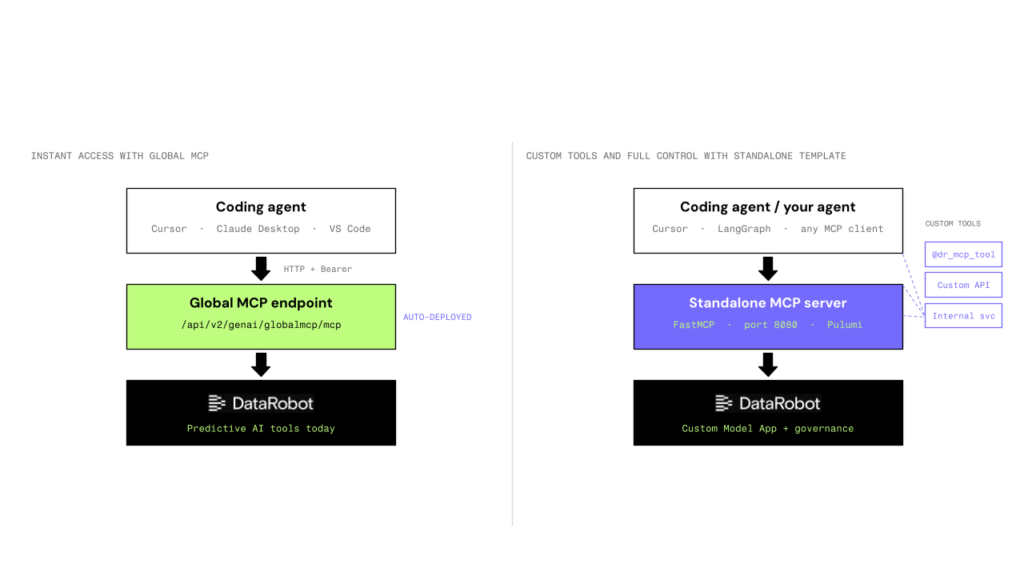
The Global MCP is auto-deployed to every DataRobot instance. Five lines in .cursor/mcp.json and you’re done:
Need custom tools or internal services exposed over MCP? The af-component-datarobot-mcp template is a FastMCP scaffold with @dr_mcp_tool decorators and Pulumi-managed deployment as a Custom Model App. Local on port 8080, production on DataRobot serverless.
Agents stop containing tool code. They ask the server what’s available and call it when they need it.
That’s the architectural payoff: add or change tools without redeploying the agent. See the LangGraph integration pattern for the mcp_tools property that auto-converts MCP tools into LangChain tools.
image
Go from spec to governed deployment — templates, Agent Assist, and the LLM Gateway
datarobot-agent-templates provides scaffolds for CrewAI, LangGraph, and LlamaIndex. Each one ships with Pulumi infrastructure, a dev server, OpenTelemetry tracing, and the necessary plumbing that turns a local agent into a governed DataRobot deployment.
Agent Assist (dr assist) is the design-before-you-code path. It walks through agent specification, generates agent_spec.md, simulates tool-calling so you can validate model and tool choice without burning real LLM calls, then scaffolds against the templates.
Underneath all of it: the LLM Gateway, an OpenAI-compatible endpoint at {DATAROBOT_URL}/api/v2/genai/llmgw. Agents written against the OpenAI Python SDK work as-is. Switching providers is a model-string change. Metering, governance, and credentialing happen at the gateway. All four interfaces share auth through a documented credential resolution order, with separate Personal, Application, and Agent API key types when you need scoped service-to-service calls.
In Cursor: install Skills, clone a LangGraph template, point your OpenAI client at the LLM Gateway, expose tools via Global MCP, run dr task run deploy. Result: a governed DataRobot deployment with monitoring and tracing.
Every capability available in the DataRobot UI is also available to your IDE and CI pipeline, so you can choose the surface that fits the task.