Engineers have invented an ingenious liquid-metal pump that could make future soft robotics and wearable devices much more portable and agile. The innovation, led by the University of Bristol and published in the journal Nature Communications, presents a low-voltage power source with the potential to transform robotic systems for a wide range of applications, from robotic legs to haptic gloves used in medical and industrial settings.
Symmetry is everywhere in nature, from the bilateral form of vertebrates to the radial geometry of starfish. For decades, roboticists have tried to copy these shapes and their abilities with bodies that look like humans, dogs or insects.
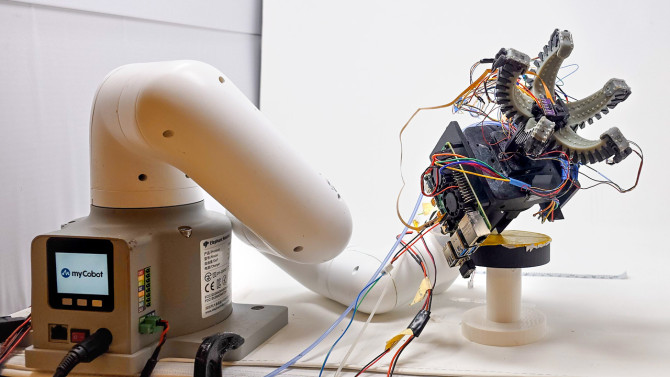
Cornell researchers used stretchable fiber-optic sensors to create a soft robot gripper that can predict the ripeness of strawberries by touch. Credit: Anand Mishra.
By David Nutt
When assessing the ripeness of fruit, sight and smell can tell you a lot, but the best indicator is often how the fruit feels.
The technology, developed in the lab of Rob Shepherd, the John F. Carr Professor of Mechanical Engineering in the Cornell Duffield College of Engineering, could lead to more resilient and ecological food production and increase the availability of fruit species that are difficult to cultivate.
Shepherd’s Organic Robotics Lab previously demonstrated the potential of stretchable fiber-optic sensors to give soft robotic systems the ability to feel the same dynamic, tactile sensations that enable humans to navigate the natural world. In recent years, the team has expanded into agriculture, designing a soft robotic gripper that injects living plant leaves with sensors that help it detect and communicate with its environment.
“The great thing about Cornell is we’re a really great agriculture school, and a lot of avenues are opening up because of it,” Shepherd said. “It really allows us to uniquely combine our robotics expertise with our agricultural prominence.”
To develop a way to evaluate and handle fruit with care, Shepherd’s team partnered with Marvin Pritts, professor of horticulture and global development in the College of Agriculture and Life Sciences, who specializes in developing sustainable production methods for berry crops.
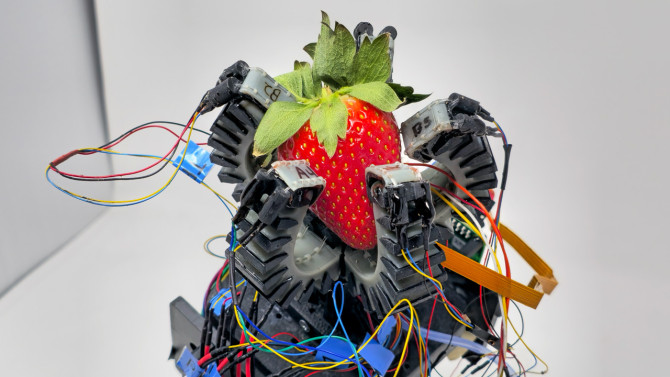
In order to train and test their gripper, they needed a model fruit. And for that, they turned to the strawberry.
“You can accurately tell when strawberries are ripe by their color,” Shepherd said. “So we could train our model to know if it’s ripe based on touch, then validate our model by looking at the color. And Anand was able to accurately estimate whether it was the right time to pick strawberries based off of the stiffness he measured.”
The soft robot gripper has an equally soft touch. The gripper is equipped with two different fiber-optic sensors, one to measure the curvature of the finger, and the other to measure the pressure at the fingertip. This way the robot can estimate the shape of an object and adjust its grip accordingly to grasp the ripe fruit without bruising it.
“The fiber-optic strain gauges have the same mechanical properties as the grippers that are using them. So it’s kind of like the flesh feels the fruit, rather than having separate sensors,” Shepherd said.
The researchers also included a planetary gear mechanism so, once the fruit is grasped, the robot wrist can rotate and twist the strawberry off its vine, instead of pulling or plucking it, which can strain and damage the fruit.
This soft-gripping technology, developed in the Organic Robotics Lab, could lead to more resilient and ecological food production and increase the availability of fruit species that are difficult to cultivate. Credit: Anand Mishra.
For cases in which touch isn’t enough, the researchers installed a camera in the gripper’s palm to find fruit that are occluded by leaves or other vegetation. However, the device will be particularly handy when ripeness can’t be detected visually, such as for avocadoes, pineapples or – Shepherd’s favorite – pawpaws.
“The problem with pawpaws is you can’t see when they’re ripe, and they ripen so fast that if you’re not there at the right time, you just miss them,” he said. “And you can’t harvest and ship them, because they don’t survive shipping very well, either. That’s one reason we don’t have pawpaws in grocery stores. But this can help with that.”
The technology could have an even greater impact on sustainable farming practices.
“Robots will allow us to do things we cannot do economically right now. We have row crops because row crops fit our machines. But if we have a larger amount of smaller robots, we can have mixed cropping of different species that support each other,” Shepherd said. “Instead of having soy one year and corn the next, you can have them both. Or you could have interspersed species that are resistant to pestilence, that help block infestations and reduce the amount of pesticides and fertilizer. You can have drought resistance from canopy species.
“It’s very complicated to manage a farm that way,” he said, “and robots could allow us to do that.”
The research was supported by the National Science Foundation Center for Research on Programmable Plant Systems (CROPPS) and the Cornell Institute for Digital Agriculture.
Every LLM deployment has a ceiling, a latency curve, and a unit cost. Most teams operate blindly, discovering their deployment limits only when over-provisioning exhausts their GPU budget or peak traffic causes a catastrophic failure.
Three numbers matter: maximum sustained concurrency before GPU saturation, end-to-end latency at that concurrency, and cost per million tokens at sustained load. These metrics emerge from how the model interacts with your hardware, runtime, tokenizer, and traffic mix.
DataRobot 11.8 changes that with LLM Profiling Jobs: a native integration of NVIDIA AIPerf, the industry-standard generative AI benchmarking tool. One authenticated POST benchmarks any DataRobot LLM deployment serving an OpenAI-compatible web server, sweeps the concurrency range and use cases you define, and returns the empirical inputs to Quota Reservations (available in DataRobot 11.9).
Why LLM capacity is hard to predict
LLM inference doesn’t scale linearly. Compute and memory demands per request depend dynamically on prompt length, response length, sampling parameters, and KV cache utilization.A deployment that serves 50 short chat turns per second can stall at 5 long-context RAG requests per second on the same hardware. Four distinct behaviors make static or speculative capacity estimates unreliable:
Latency is non-linear in concurrency. Time to first token and inter-token latency stay roughly flat across a wide concurrency range, then rise sharply once GPU memory bandwidth or compute saturates. TTFT rises when prefill compute saturates; inter-token latency rises when decode memory bandwidth saturates. Which one bites first depends on the workload mix and the deployment’s GPU configuration (single card or a cluster). The saturation knee is the operating point that matters, and it can’t be inferred from a single low-load measurement.
Throughput and latency trade off. You can squeeze more total tokens per second out of a deployment by running it at higher concurrency, at the cost of slower per-user response. The right trade-off depends on your SLO, not on a generic recommendation.
Use case mix matters. Two deployments running the same model on the same hardware can have very different capacity if one serves short Q&A and the other serves long-context summarization. The mix has to be in the test, or the test is wrong.
Caching and routing change the answer. Prefix caching (common in agentic coding with periodic compaction) and KV-aware routing can lift effective throughput dramatically. Profiles run against a cold deployment with random inputs represent the floor, not the ceiling.
LLM Profiling Jobs make those curves visible.
How LLM benchmarks help
Defend capacity and quota decisions with measured data. When finance questions a four-H100 footprint, or when cross-functional teams negotiate shared capacity, you can justify the architecture with empirical profiling data. Saturation knee, SLO target, and forecast traffic make GPU sizing an evidence-based line item. The same numbers feed Quota Reservations directly.
Account for cost per consumer. Total token throughput plus the GPU instance cost gives a cost-per-million-tokens figure that supports chargeback or showback. Attribute spend to consumers proportionally to their reservations, not by guesswork.
Compare models and hardware on equal terms. Hold the workload profile constant and vary one dimension at a time: the same model on different GPU configurations (a B200 node vs a B300 node, or 4×H100 vs 8×H100), or different models on the same configuration (Qwen3.6 35B-A3B MoE vs Qwen3.6 27B dense). Because AIPerf metrics match NVIDIA’s published NIM benchmarks, the numbers are also directly comparable to public benchmarks for the same model and hardware combinations. The right input for procurement and capacity-sizing decisions before a hardware order.
Prove a change is safe before you ship it. Before a model upgrade, vLLM bump, driver swap, or GPU migration, rerun the same profile and compare against the prior baseline. Regressions show up in the metrics, not in incident reports.
What LLM benchmark metrics mean
The four headline metrics AIPerf returns map directly to user experience and to GPU economics:
Time to first token (TTFT, ms). Measures how long a user waits between submitting a prompt and seeing the first character; this metric is dominated by prefill compute.
Inter-token latency (ITL, ms). Average time between successive output tokens once generation has started. Sets the perceived “typing speed” of the response.
Request throughput (requests/sec). Full request-and-response cycles per second at the tested concurrency. The basis for the Capacity (RPM) value on Quota Reservations.
Total token throughput (tokens/sec). Total tokens (input plus output) processed per second across all concurrent requests. The basis for cost-per-token economics.
For each metric, AIPerf reports averages and percentiles (p50, p90, p99). When GPU saturation is detected during the sweep, estimatedCapacity reports the iteration immediately before it. When saturation isn’t detected (the common case, since the profiler isn’t co-located with the deployment), estimatedCapacity reports the last iteration tested. Sweep wide enough that the curve clearly bends, or treat the result as a lower bound.
Submitting a job
A profiling request takes four parameters: a deploymentId (the ID of the DataRobot LLM deployment you want to profile), a list of concurrency levels to sweep, a request count scalar (how many requests each concurrent worker issues), and one or more use cases. Each use case defines an input sequence length (ISL), an output sequence length (OSL), standard deviations for both, and a weight (prob). Weights across all use cases must sum to 100.
Poll the Status API with the returned statusId. When the job finishes, the API returns 303 See Other and the Location header points to the results endpoint:
estimatedCapacity is the sustained operating point. results contains one entry per concurrency level tested, with the full metric set.
Reading the curve
The estimated-capacity numbers tell you the sustained ceiling. The per-iteration results show you how the deployment behaves as load climbs toward that ceiling. The table below is an illustrative example.
When AIPerf detects GPU saturation during the sweep, it identifies the iteration before it (concurrency 50 here) and returns those metrics as estimatedCapacity. When saturation isn’t detected, estimatedCapacity is simply the last iteration tested, which is why the sweep needs to extend past the knee. Anything past that point trades user-perceived latency for marginal throughput gains. If the product spec calls for TTFT under 1 second, the curve shows the deployment supports up to roughly 50 concurrent requests with margin: provision GPU so peak concurrent demand stays at or below that level.
From profiling result to Quota Reservations config
The bridge from a profiling run to a Quota Reservations configuration is direct:
Quota setting
Where it comes from
Example (from sample above)
Capacity (RPM)
estimatedCapacity.request_throughput × 60
8.84 req/sec × 60 ≈ 530 RPM
Utilization Threshold
Pick 70–80% of Capacity so enforcement engages before the saturation knee
80% → enforcement at ~424 RPM
Reserved % per consumer
Sized to the minimum each priority consumer needs during contention
30% Production Agent A, 20% Agent B, 30% Agent C, 20% unreserved pool
Take the sample result: 4,524 total tokens per second sustained (input plus output). That is roughly 16.3 million tokens per hour from one deployment.
If the underlying GPU instance costs $X per hour, the cost per million tokens is $X / 16.3. For an instance at $4 per hour, that is about $0.25 per million tokens. For $12 per hour, about $0.74. To calculate cost per million output tokens—the standard benchmark for public API comparisons—divide the total cost by the workload’s output share. For example, given an ISL of 200 and an OSL of 1000, output accounts for roughly 83% of total tokens. At a $4 hourly instance price, this translates to approximately $0.30 per million output tokens.
Every benchmark run gives you a fresh, accurate cost-per-token figure for the exact model, hardware, and quantization combination you’re running. After a vLLM upgrade or a hardware swap, re-run the same profile and confirm your unit economics improved instead of trusting a vendor claim. This is the foundation for per-token and per-agent cost transparency in chargeback.
Choosing your inputs
A useful profile starts with two questions: what concurrency range do you expect in production, and what does your traffic actually look like?
Concurrencies to sweep. Start wide ([1, 10, 50, 100]) to locate the saturation knee, then narrow (such as [40, 50, 60, 70]) for an SLO-grade reading around that point.
Request count scalar. Set it high enough that each iteration runs long enough to smooth out noise. A scalar of 2 is a reasonable starting point. Raise it if variance looks high.
Use cases. Match your real traffic mix. If you serve 70% short chat turns (ISL 200, OSL 300) and 30% long-context RAG (ISL 4000, OSL 800), define two use cases with prob: 70 and prob: 30. Testing a blended traffic mix exposes tail-latency behavior (such as p99 spikes) that a single-use-case average obscures.
Tokenizer. Set it explicitly. The benchmark depends on accurate token counts, so the matching tokenizer is part of a correct measurement.
Operational notes
Profiling generates synthetic load. Run jobs against a non-production LLM deployment or during a maintenance window.
Because the traffic is synthetic, prefill cache hits won’t appear in token metrics.
Profiling treats the deployment as a black box. Whether the deployment runs on one GPU or many, and whatever combination of tensor, pipeline, data, or expert parallelism it uses, the profile measures the externally observable result.
Jobs can be canceled with a DELETE to the profiling job ID. Cancellation is best-effort and may not stop a run that is nearly complete.
Before you submit, store your Hugging Face token in DataRobot Credential Management as an “API Token (API Key)” credential. AIPerf uses it to fetch the model tokenizer, and the stored credential prevents rate-limit errors.
Get access
LLM Profiling Jobs are in private preview in DataRobot 11.8. To enable on your tenant, contact your DataRobot account team. They will turn on the Enable Dynamic Quota Capacity Profiling feature flag (the internal name for LLM Profiling Jobs) and configure the profiling job image in your cluster.
At the core of the Titanium platform is a unique combination of multi-axis control, high computing power, and integrated functional safety, all within an exceptionally small footprint.
A new AI-powered chip from UC Davis can analyze light and chemicals using a device tiny enough to fit almost anywhere. By combining smart silicon sensors with machine learning, it achieves lab-style spectral analysis without the bulky equipment.
In real right-angle gear projects, the biggest problems often come not from the gear type itself, but from mismatch between joint targets, support design, and acceptance criteria.
Scientists from Nanyang Technological University, Singapore (NTU Singapore) have developed a tiny seed-sized robot that can navigate across soft and uneven surfaces to perform five surgical functions wirelessly, paving the way for developing robots to make surgeries and medical treatments more precise.
The next generation of motion control solutions that deliver outstanding performance. The Elmo advanced Titanium line of servo drives offers optimal performance and high-power density, delivering exceptional, intelligent, and compact drives that are operational within minutes. These single-axis and multi-axis servo drives, featuring top-performance multi-core processors, deliver superior productivity, Functional Safety, advanced networking, and local intelligence in a compact package.
There's a delicate art to teaching robots, even when you're preparing them for predictable environments like factories, where they'll repeat the same tasks a little differently depending on the obstacles they face. Whether a human is suddenly in their way or there's new clutter, the machine must closely mimic its operator's actions by staying on a trajectory (or motion path).
2026 European Humanoid Robots Summit Lands in Stuttgart This September Global Leading Experts Gather to Discuss Mass Production, Deployment & Industry Future As a landmark event for the global humanoid robotics industry, the summit focuses on technological innovation, commercialization, and ecosystem collaboration. Following the successful launch of the 2025 European Humanoid Robots Summit in Berlin, […]
Generative AI is transforming the workplace faster than ever, but new research from the University of Vaasa suggests the biggest threat may not be AI itself — it’s falling behind in learning how to use it. Researcher Zhe Zhu found that employees who see tools like ChatGPT and Gemini as helpful collaborators rather than job-stealing rivals tend to be more engaged, adaptable, and optimistic about their careers.
Google is out with a torrent of new AI tools and updates designed to charm writers and creators looking for the utmost in creativity and productivity.
Many of the tools can be especially powerful, given that they’re part of the Google ‘ecosystem,’ and can be easily connected with a number of other Google tools for added performance.
Here are the top ten you’ll want to check-out:
*Doc’s Live: Create and Edit Docs With Your Voice: While AI voice-to-text apps have been around for a while, Google takes this capability a step further by enabling you to create a Google doc with your voice – and pull relevant data for that doc from your Gmail, Google Drive, Google Chat and the Web.
Promised for sometime this summer, Doc’s Live invites you to simply talk and then does the rest by helping you brainstorm, organize your thoughts and structure your document.
Planned for release to Google AI Pro and Google Ultra subscribers, Doc’s Live is also promising to help you tweak the writing style of your doc to your personal preference.
*Ask YouTube: Dig Deeper for Knowledge-Gems on Video: Writers looking to get a better grasp of what YouTube videos have to offer will want to check out this new tool, designed to enable you to do much more complex searches on YouTube.
Each ‘Ask YouTube’ search query will trigger creation of a compilation of relevant videos across YouTube’s entire catalogue, including long-form videos and shorts.
You’ll need a YouTube Premium subscription for the service – which also removes all those ads that YouTube drops into videos.
*Google Pics: A New AI-Powered Designer:Promised for release this summer, Google Pics is a new AI-powered design tool for creating slides, social media posts, business logos, digital brochures, infographics and similar.
Special features include the ability to edit the specific design and text of your work with precision, as well as the ability to integrate Google Pics with Google Workspace.
When available, you’ll need a Google AI Pro or Google AI Ultra subscription to use Google Pics.
Designed to organize and prioritize your day, Daily Brief – currently available to all Google AI subscribers (18+) in the Gemini app – is a personalized digest that keeps track of your key goals and suggests the next steps for getting there.
Intriguingly, the AI agent works overnight, analyzing your inbox, calendar and tasks while — in a perfect world — connecting all the dots across your life.
*Gemini Spark: An Army of AI Agents Working for You: Promised for release sometime this summer, Gemini Spark is Google’s answer to OpenClaw – an Open Source program that uses multiple AI agents to complete an ongoing series of tasks for you in background.
Such a system – which can be programmed to make decisions for you such as making purchases, sending automated emails, engaging in ongoing research and setting up a flight booking – can be tricky to get right.
Ergo, Google is promising to be extra careful with this one before releasing it wide.
Ideally, Google’s search agents can take any question dream up and run with it, relentlessly scouring blogs, news sites, social media posts and more to return with regular, synthesized updates relevant to your query.
You can use search agents, for example, to scan the Web for new stories on Open Source AI models that offer the greatest creativity when it comes to writing.
*AI Inbox: Yet Another Email Inbox Organizer: Granted, there seem to be any number of AI tools promising to make email processing a breeze, but Google believes this one is extra special.
Essentially, this upgraded version of AI Inbox – already available for Google AI Ultra subscribers and rolling out to Google AI Plus and Google AI Pro subscribers — is designed to surface the emails that matter most to you each day and prioritize you To-Dos.
AI Inbox will also generate personalized email replies – for your approval — based on contextual information.
Plus, this summer, Google is promising that Google AI Pro and Google Ultra subscribers will be able to use AI Inbox to “talk” to their Gmail without being forced to dig through conversational threads.
*New Gemini 3.5 Flash: AI for the Down and Dirty: While you’ll want to use Google 3.1 Pro for answers that require deeper reasoning and more thoughtful replies, this Flash upgrade for Gemini is for those looking for fast answers that may be a little rough around the edges.
Google is also promising that the new Gemini 3.5 Flash is perfect for tackling long-horizon agentic tasks.
Meanwhile, Gemini 3.5 Pro – Flash’s heftier cousin – is promised for release sometime in June 2026.
No more. With Gemini Omni Flash, you can ideally feed Gemini AI any type of input – text, images, audio or video – and the tool will output video for you.
Moreover, videos can be created by adding text instructions regarding what you’re looking for. Or, you can get things going with a conversational interface that pops up when you simply enter a raw input with no instructions.
Available for AI Plus, AI Pro and AI Ultra subscribers, Gemini Omni Flash includes an improved intuitive understanding of forces like gravity, kinetic energy and fluid dynamics, allowing you to create more realistic scenes, according to Koray Kavukcuoglu, a chief AI architect at Google.
*The Whole Kit-and-Kaboodle: Other interesting, new AI and AI upgrades from Google of interest to writers include Personal Intelligence, Google Flow, Google Antigravity, SynthID and Neural Expressive.
You can grab the skinny on all those – as well as a full overview on virtually every important news-making new AI from Google — at “100 Things We Announced at I/O 2026.”
Share a Link: Please consider sharing a link to https://RobotWritersAI.com from your blog, social media post, publication or emails. More links leading to RobotWritersAI.com helps everyone interested in AI-generated writing.
–Joe Dysart is editor of RobotWritersAI.com and a tech journalist with 20+ years experience. His work has appeared in 150+ publications, including The New York Times and the Financial Times of London.
By analyzing over 400,000 Reddit posts, researchers discovered that users of popular GLP-1 weight-loss drugs frequently discussed unexpected symptoms like menstrual irregularities, chills, and hot flashes. The findings suggest AI could turn social media into a powerful early-warning system for spotting side effects that clinical trials may miss.
Scientists have created an AI-powered system that can scan and map an entire mouse body in extraordinary detail — and it just uncovered a surprising new effect of obesity. Beyond disrupting metabolism, obesity appears to damage facial sensory nerves linked to touch and sensation, while also triggering widespread inflammation across the body.
 Cornell researchers used stretchable fiber-optic sensors to create a soft robot gripper that can predict the ripeness of strawberries by touch. Credit: Anand Mishra.
 This soft-gripping technology, developed in the Organic Robotics Lab, could lead to more resilient and ecological food production and increase the availability of fruit species that are difficult to cultivate. Credit: Anand Mishra.

