Scientists in Germany have demonstrated a startling new form of surveillance: identifying people using nothing more than ordinary WiFi signals. By analyzing how radio waves bounce around a room, researchers can effectively “see” and recognize individuals — even if they are not carrying a device and even if their phone is turned off.
Rate Limiting vs. Quota Reservations: when to use each
You have a single gpt-oss-20b deployment. Six teams want to use it. Marketing is running batch summarization jobs at 3am. The fraud team needs sub-second responses 24/7. An intern’s Jupyter notebook is accidentally hammering the endpoint in a tight loop. And your GPU bill is already eye-watering.
Sound familiar? DataRobot gives you two tools to solve this: Rate Limiting and Quota Reservations. This post explains when to reach for each, backed by a real load test example on a staging deployment.
Rate Limits and Quota Reservations, in plain English
Rate Limits – Available in DataRobot v11.4
Rate limits sets per-consumer caps across multiple dimensions: requests per minute, token count per hour, concurrent requests, and input sequence length. A default policy applies to all consumers, with per-entity exceptions available for specific overrides.
What it protects against: Any single consumer overconsuming — whether through high request volume, large inputs, or excessive concurrency.
Quota Reservations – available in DataRobot v11.9
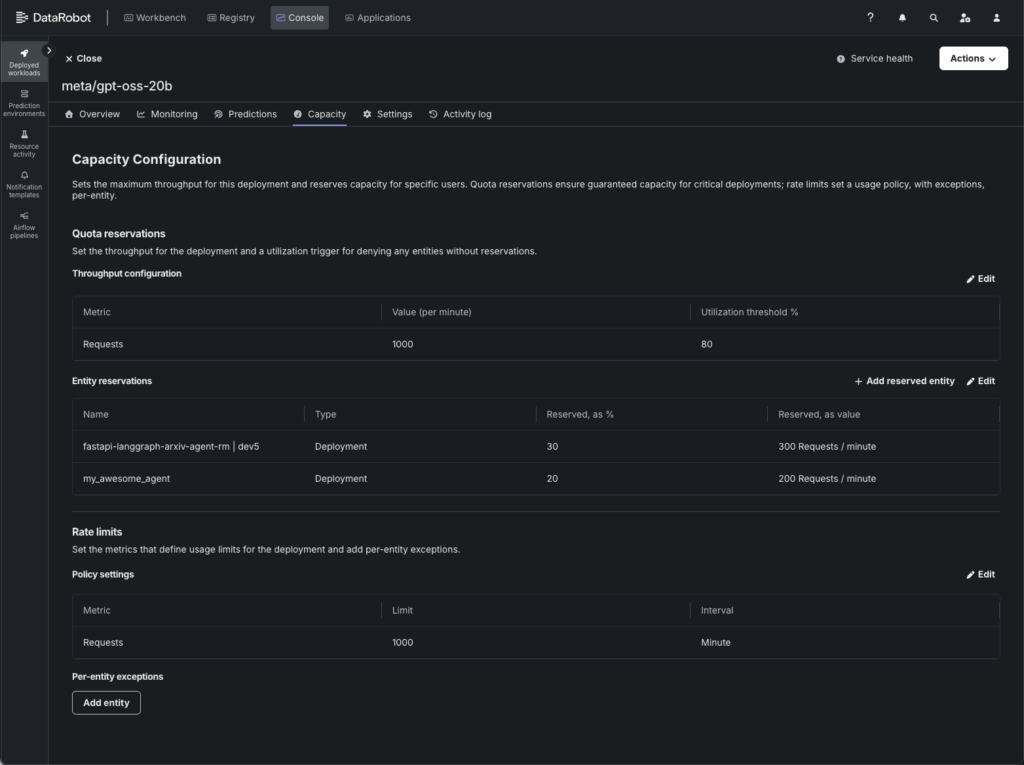
Quota reservations define the deployment’s total possible throughput (value per minute) and a utilization threshold that triggers enforcement. Within that budget, specific entities can be allocated a reserved percentage — guaranteeing them a minimum slice of capacity that other consumers can’t take away.
What it protects against: Priority starvation. Without reservations, a noisy neighbor can consume the entire capacity budget, leaving your critical workloads with nothing.
How Rate Limits and Quota Reservations work together (and apart)
Used alone, each tool solves a specific problem:
Rate limiting alone caps total throughput. Under saturation, all consumers compete equally — first come, first served.
Quota reservations alone guarantee minimum throughput for specific consumers, regardless of what others are doing.
Together, they give you both control surfaces: a ceiling that protects the model and guaranteed floors for the consumers that matter most.
Load testing a multi-tenant deployment
To evaluate these features under pressure, we load-tested a gpt-oss-20b deployment in our staging environment. The setup simulates a real multi-tenant scenario: four consumers sharing one model, each with different priority levels.
Example configuration
Setting
Value
Model
gpt-oss-20b (NVIDIA NIM)
Capacity
1000 RPM
Utilization Threshold
80% (enforcement kicks in at 800 RPM)
Consumer
Type
Reserved Capacity
Effective Guarantee
Production Agent A
Deployment
30%
300 RPM
Production Agent B
Deployment
20%
200 RPM
Production Agent C
Deployment
30%
300 RPM
Dev User (unreserved)
User
–
None — shares the 20% unreserved pool
This left a 20% unreserved pool (200 RPM) for the dev user and any overflow.
Example load profile
We ran six escalating scenarios over 17 minutes to observe behaviour at different saturation levels:
Scenario
What Happens
Combined Load
Normal traffic
All four consumers at moderate, throttled rates
~600 RPM (below utilization threshold)
Slight overload
All four consumers ramp up to just over capacity
~1,200 RPM (1.2× capacity)
Heavy overload
All four consumers fire as fast as possible
~7,200 RPM (7× capacity)
Extreme overload
Maximum concurrent workers per consumer
~12,000 RPM (12× capacity)
Late joiner
Three agents flood first, dev user joins 60s later
~9,000 RPM
Reserved-only
Three agents compete, dev user silent
~7,200 RPM
When to use Rate Limiting alone
Rate limiting by itself is the right choice when:
All consumers are equally important. If no team’s traffic is more critical than another’s, there’s no need for reservations. Equal competition under saturation is fair enough.
You just need to protect the GPU. Your primary concern is that a spike in traffic doesn’t degrade model latency or cause OOM errors. You want a safety valve, not a traffic policy.
You have a single consumer. If there’s only one application hitting the deployment, reservations are meaningless — there’s no one to reserve against.
What the example showed
During the normal traffic scenario (~600 RPM combined, well below the 800 RPM utilization threshold), the rate limiter was invisible and all four consumers achieved 100% success rates with zero rejected requests.
Scenario
Combined RPM
Success Rate
429s
Normal traffic
~600
100%
0
Size your reservations based on the absolute minimum throughput each consumer requires during peak contention. This is by design, so you’re not penalizing normal traffic.
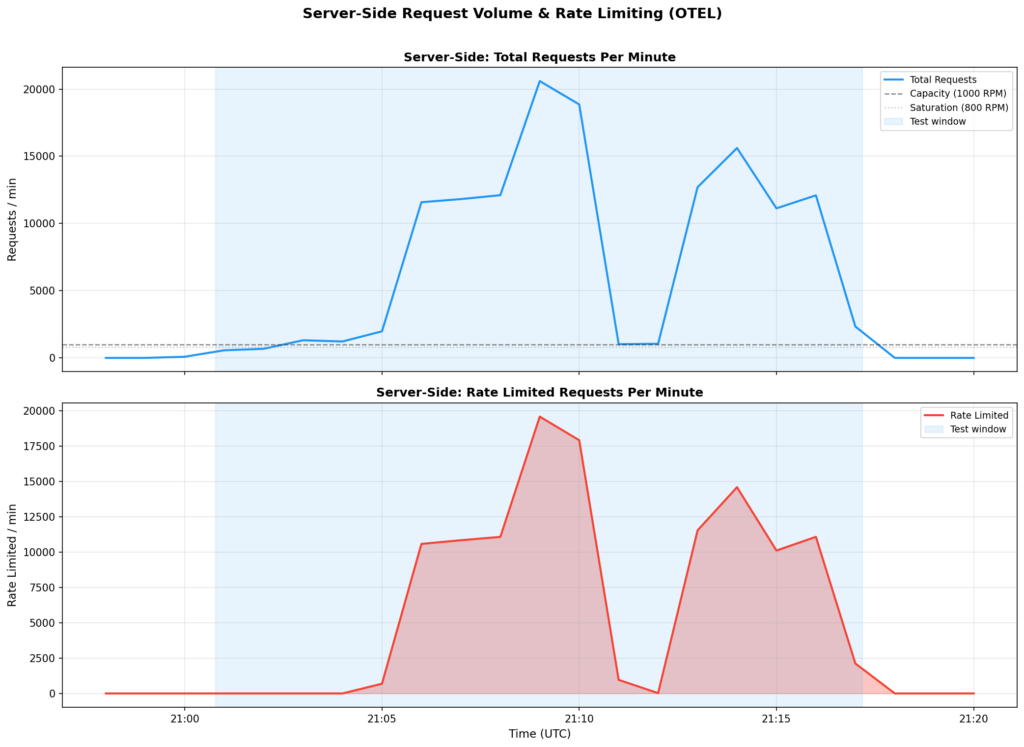
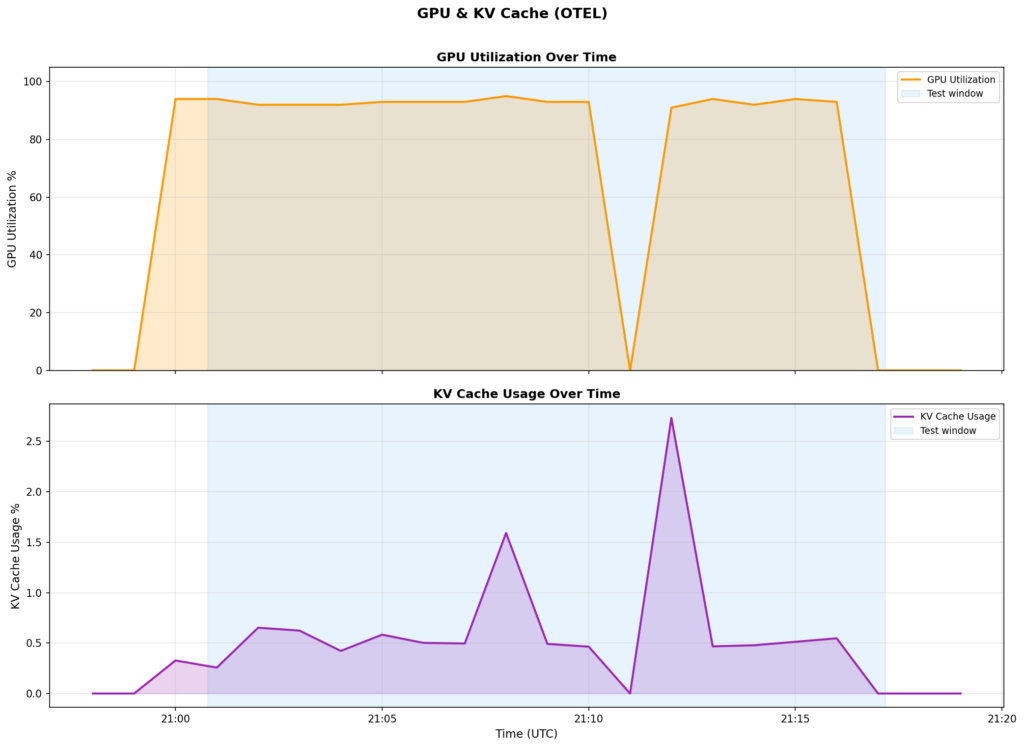
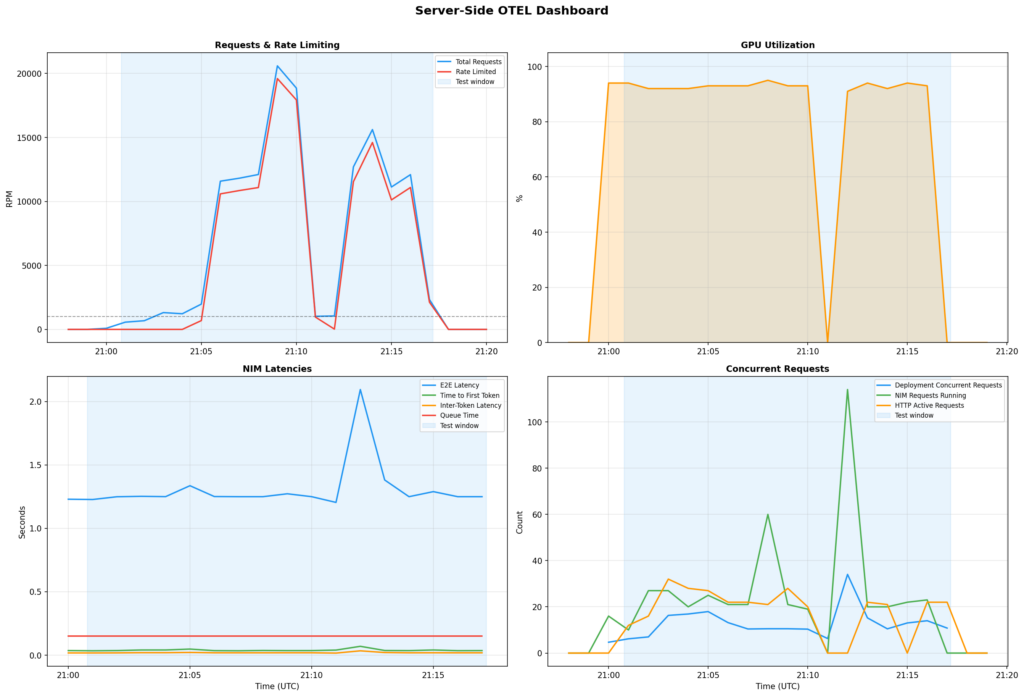
And it protects the model even under extreme abuse. During the extreme overload scenario (20,000+ RPM against 1,000 RPM capacity, which is a a 20× overload), the rate limiter rejected 95% of requests. But the model itself stayed perfectly healthy:
NIM Metric
Under 20× Overload
GPU Utilization
91–95% (stable)
E2E Latency
1.25s → 2.09s (brief spike, then stable)
Time to First Token
35ms (unchanged)
Inter-Token Latency
18ms (unchanged)
KV Cache
<3% (not stressed)
The rate limiter acted as a firewall between chaotic client demand and stable model inference. Without it, those 20,000 requests per minute would have queued up inside the NIM, latency would have ballooned, and the model would have effectively become unusable for everyone.
Takeaway: If your only goal is “don’t let traffic spikes kill the model,” rate limiting alone is sufficient and zero-config beyond setting the capacity number.
When to add Quota Reservations
Quota reservations become essential when:
Some consumers are more important than others. Your fraud detection system can’t afford to be starved out by a batch analytics job. Your production agent needs guaranteed throughput that a developer’s test harness can’t steal.
You have a multi-tenant deployment. Multiple teams, applications, or downstream deployments share the same model. Without reservations, the loudest consumer wins.
You want predictable SLAs. If you’ve promised a team “your application will get at least 300 RPM,” reservations are how you enforce that promise at the infrastructure level.
You have a mix of interactive and batch workloads. Batch jobs are bursty and will happily consume all available capacity. Reservations ensure interactive workloads still get their share during batch spikes.
How to size reservations
Size your reservations based on the absolute minimum throughput each consumer requires during peak contention.
Rules of thumb:
Don’t reserve 100%. Leave an unreserved pool (10–20%) for ad-hoc traffic, new consumers, and overflow. If you reserve everything, any new application gets zero throughput until you reconfigure.
Size reservations to minimum needs, not peak needs. Reservations guarantee a floor, not a ceiling. An entity with 30% reserved can still use more than 30% when capacity is available.
Match reservation size to business criticality, not team size. Your fraud detection system might have fewer requests than your analytics pipeline, but it needs guaranteed access more.
In our example, three production agents received 30%/20%/30% reservations, leaving a 20% unreserved pool for the dev user. This meant the dev user could still use the deployment — they just wouldn’t get guaranteed access during contention.
Do reservations work under real load?
At slight overload (1.2× capacity): The system degrades gracefully
During the slight overload scenario (~1,200 RPM against 1,000 RPM capacity), all four consumers achieved 100% success — the token bucket’s burst capacity absorbed the slight overage. This is the “graceful degradation” zone where reservations aren’t yet needed, but the system is proving it can handle bursts.
At heavy-to-extreme overload (7–12× capacity): reservations maintain a guaranteed floor
When all four consumers fired as fast as possible (7,000–12,000 RPM against a 1,000 RPM capacity), the system was overwhelmed. Here’s what each consumer experienced across the full test:
Consumer
Reserved
Success Rate
Successful Requests
Production Agent A
30%
29.0%
4,172
Production Agent B
20%
30.2%
4,332
Production Agent C
30%
28.9%
4,176
Dev User (unreserved)
–
28.9%
2,828
Why the success rates look similar: At 12× overload, even a 300 RPM reservation is only ~2.5% of what each consumer is attempting to send (~3,000 RPM per consumer vs. a 300 RPM guarantee). The reservation works by ensuring each consumer receives its guaranteed 200–300 RPM. However, because 97% of total traffic is rejected during extreme overloads, the relative percentage differences compress.
The more revealing metric is absolute throughput. Reserved consumers completed 4,172–4,332 successful requests. The unreserved dev user completed 2,828 — about 34% fewer. Even accounting for the dev user’s shorter active time, reserved consumers consistently got more requests through during shared scenarios.
At saturation with a late joiner: reservations protect incumbents
In the late joiner scenario, the three production agents were already flooding the system when the dev user joined 60 seconds later. With all reserved capacity spoken for, the dev user was confined to the 20% unreserved pool (~200 RPM). The production agents continued drawing from their guaranteed buckets, unaffected by the new arrival.
This is the scenario that matters most in production. A batch job kicks off, or a new application goes live, and suddenly there’s more demand than supply. Without reservations, the new load pushes everyone’s throughput down equally. With reservations, your critical consumers are shielded.
Reserved consumers compete fairly among themselves
In the reserved-only scenario, the dev user went silent and only the three production agents competed. Their success rates were nearly identical (28.9%–30.2%) — the system divided throughput proportionally across their reservations.
What the server sees: OTEL metrics tell the story
Client-side metrics (success rates, 429 counts) tell you what your consumers experienced. Server-side OTEL metrics tell you what the platform experienced. Here’s what our example deployment looked like from the inside.
The rate limiter protects model health
During peak load (20,596 requests/minute hitting the endpoint), the NIM was serving only the ~1,000 RPM that the rate limiter let through:
What the endpoint saw
What the NIM saw
20,596 requests/min
~1,000 requests/min (served)
19,603 rate-limited/min
18–22 concurrent requests
—
1.25s E2E latency (stable)
—
91–95% GPU utilization (healthy)
Without rate limiting, those 20,000 RPM would have queued inside the NIM. The GPU wouldn’t have gotten more productive — it’s already at 91–95% — but latency would have spiraled as requests stacked up. Instead, the rate limiter rejected excess requests immediately (at 429-response speeds, not inference speeds), keeping the model responsive for the traffic it did accept.
Token throughput follows successful requests
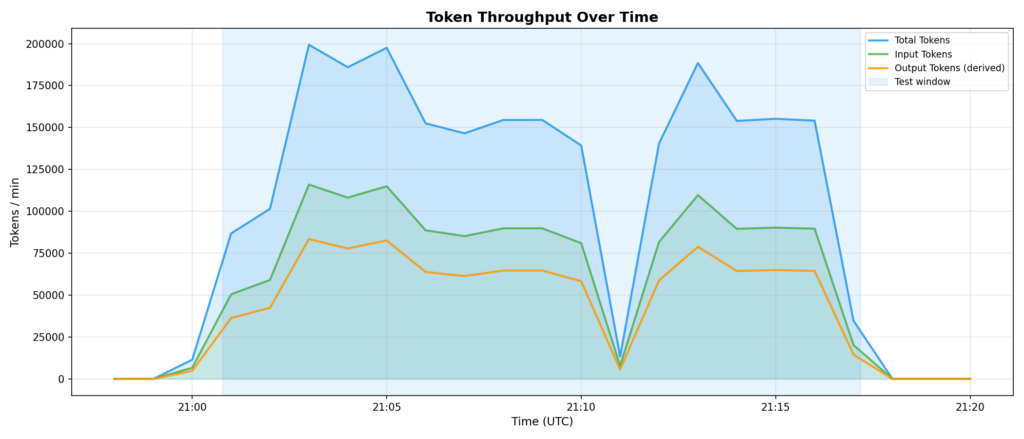
Peak token throughput was ~199,350 tokens/min (total), with ~115,939 input and ~83,411 output. These numbers track directly with the rate limiter’s allowed throughput — not with the attempted request volume. Another way of seeing that the rate limiter is correctly shaping traffic.
Deciding between Rate Limits and Quota Reservations
Use this flowchart to decide what to configure:
Step 1: Do you have a shared deployment with multiple consumers?
No → Rate limiting alone is sufficient. Set capacity to protect the GPU and move on.
Yes → Continue to Step 2.
Step 2: Are all consumers equally important?
Yes → Rate limiting alone may be enough. Under saturation, all consumers compete equally — first come, first served. If that’s acceptable, stop here.
No → Continue to Step 3.
Step 3: Do any consumers need guaranteed minimum throughput?
Yes → Add quota reservations. Size them to the minimum RPM each critical consumer needs during peak contention.
No, but some consumers need to be deprioritized → Use per-entity exceptions instead of reservations. Cap the noisy neighbors rather than guaranteeing the critical ones.
Step 4: Configure the unreserved pool.
Don’t reserve 100% of capacity. Leave 10–20% unreserved for ad-hoc traffic, overflow, and new applications that haven’t been assigned reservations yet.
Practical configuration tips
Start with rate limiting only. Monitor your deployment’s traffic patterns for a week. Look at peak RPM, who’s sending what, and whether anyone is consistently overconsuming. Then add reservations where the data tells you they’re needed.
Set utilization threshold at 70–80%. This gives the token bucket burst room to absorb short spikes without triggering rate limiting on every minor fluctuation. In our example, we used 80% and the system handled 1.2× capacity gracefully before enforcement kicked in.
Monitor with OTEL metrics. After configuring rate limiting, check these server-side metrics to confirm things are working:
deployment.requests vs deployment.requests.rate_limited — are you rejecting the right amount?
nvidia_gpu_utilization — is the model still saturated or did rate limiting create headroom?
nvidia_vllm:e2e_request_latency_seconds — is latency stable under load?
deployment.concurrent_requests — are requests queuing up or flowing smoothly?
Reservation sizing formula:
Reserved RPM = Capacity × Reserved %
Example: 1000 RPM × 30% = 300 RPM guaranteed
Don’t confuse this with a rate limit. A 30% reservation means “you’ll always get at least 300 RPM, even when the system is saturated.” The entity can still use more when capacity is available.
Soft robotics—machines made of flexible, muscle-like materials—can bend and stretch in fluid ways that put the rigid robots of old sci-fi movies to shame. But the flexibility that lets them pick ripe tomatoes or navigate a search-and-rescue site comes at a cost: Soft robotics are notoriously difficult to control.
Over the past few decades, roboticists worldwide have introduced increasingly advanced robots that can understand human instructions, move in their surroundings and reliably complete basic manual tasks. While they perform well in some scenarios, many of these robots still struggle to translate the instructions of users into precise and executable actions that would allow them to successfully complete desired tasks.
Autonomous robots can perform tasks with limited human intervention, while Physical AI gives machines the ability to understand their environment, make decisions, and interact with the physical world more effectively.
Claire chatted to Josie Hughes from École Polytechnique Fédérale de Lausanne about using AI to develop new designs for robotic manipulators.
Josie Hughes is an Assistant Professor at EPFL, where she established the CREATE Lab in 2021. She completed her PhD in the Bio-inspired Robotics Lab at the University of Cambridge, examining the role of passivity in bio-inspired manipulators. Her research focuses on developing novel design paradigms for designing robot structures that exploit their physicality and interactions with the environment. This includes the development of robotic hands, soft manipulators, and automation systems for applications focused on sustainability and science.
The hardest part of building against a new platform is teaching your tools about it. Your coding agent doesn’t know the SDK’s conventions. Your IDE doesn’t know the CLI commands. Your terminal doesn’t know the auth pattern. Every gap is a context switch, and every context switch is time spent away from the work. DataRobot Skills close those gaps inside the tools you already use. Our marketplace listings in Anthropic, Gemini and Cursor close them at the install step.
What are Skills?
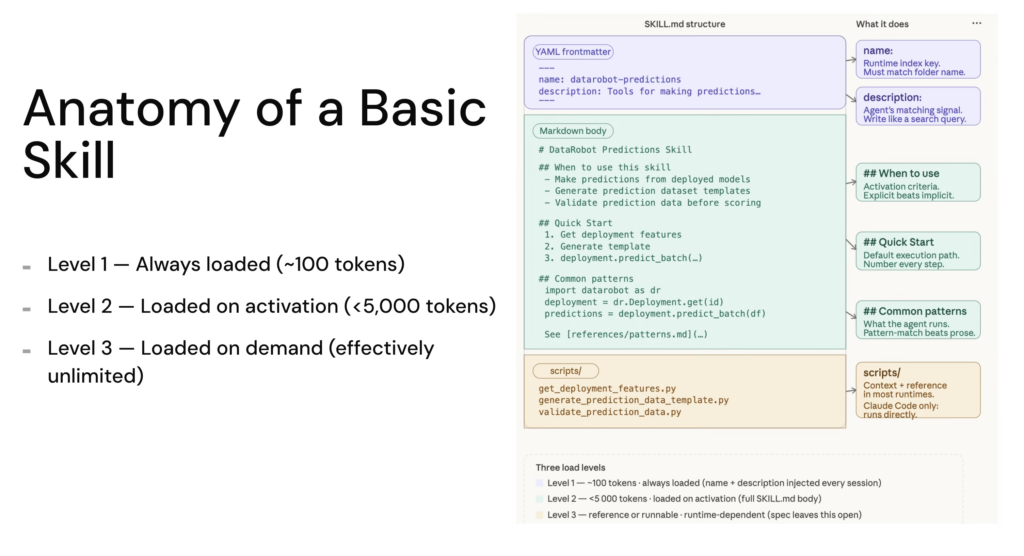
A Skill is a folder with a SKILL.md file. The frontmatter tells the agent when the skill applies. The body tells it how to do the work. The agent loads only the skills relevant to the current task, so context stays clean and reasoning stays sharp.
DataRobot Skills are Agent Context Protocol definitions. They work across Claude Code, Cursor, Codex, Gemini CLI, Amp, VS Code Copilot, Goose, Letta, Kilo Code, and OpenCode. They are not slash commands and not MCP tools. They are the procedural knowledge your agent needs to use the SDK, the CLI, and the platform correctly, every time.
The point of the marketplace listings is to remove the install step entirely so developers find DataRobot at the moment they’re picking tools, not after they’ve already committed to a workflow.
The repo currently ships 10+ official Skills, with new Skills being added every week. Each one corresponds to a core part of the DataRobot agent building workflow.
Skill
What it teaches the agent
datarobot-setup
The on-ramp. Installs the DataRobot CLI, Python SDK and Agent Assist, configures the endpoint and API key, and verifies connectivity. Run this first and you don’t need to worry about a single thing around setup.
datarobot-agent-assist
The full agent lifecycle. Generates agent_spec.md from a guided design conversation, rehearses tool calls before any code is written, scaffolds against the Agentic Starter template, runs local tests, and deploys to the DataRobot platform.
Performance and data drift monitoring, accuracy tracking, alert configuration.
datarobot-model-explainability
Prediction explanations, feature impact, model diagnostics.
datarobot-data-preparation
Dataset upload, validation, schema checks, and registry workflows.
datarobot-app-framework-cicd
CI/CD pipelines for DataRobot application templates.
datarobot-external-agent-monitoring
OpenTelemetry instrumentation for external agents reporting into DataRobot.
Two of these change the experience the most. datarobot-setup is the on-ramp: before it existed, a developer who installed the Skills still had to manually authenticate, point the SDK at the right base URL, and confirm everything was wired up. Now the setup phase becomes another thing the agent does, not another thing the developer does.
datarobot-agent-assist brings the spec-driven design loop into the same context. Instead of switching to a different tool to design an agent, the developer asks for help, the skill activates, and dr assist runs from inside the same IDE conversation, producing an agent_spec.md and rehearsing the tool calls before any code is written. Design, test and deploy, all inside the agent loop.
How to install DataRobot Skills
Cursor
Open the Cursor marketplace entry for DataRobot, click the “Add to Cursor” button, and Cursor handles the rest. The Skills register against the workspace and become available in any chat. If you’d rather pin to the repo and version-control the install, open the repo as your workspace and Cursor reads AGENTS.md automatically.
Gemini CLI
Gemini CLI now treats DataRobot as an extension with bundled Skills. From your terminal:
The Skills land in ~/.gemini/extensions/datarobot-agent-skills/skills and load on session start. Use /skills list inside a Gemini session to confirm. Environment variables propagate automatically.
Claude Plugins
For Claude users, DataRobot Skills are available through the plugin marketplace listing and you can run this command:
claude plugin install datarobot-agent-skills@claude-plugins-official
Universal Instructions
The universal installer is the answer if you are running an AI IDE or CLI not listed above:
The marketplace listings are the first step in distributing DataRobot’s developer surface the same way modern infrastructure tools distribute theirs. Expect the catalog to grow: more skills around the agent lifecycle, more bundled flows for Agent Assist, deeper coverage of governance and observability patterns that today live in docs rather than in agent context.
If you want to see what’s there now or contribute a pattern your team uses, the source of truth is the repo: github.com/datarobot-oss/datarobot-agent-skills. The marketplace listings track it.
The developer experience DataRobot is building is one where the platform shows up in the surface you already chose, with the on-ramp baked in. Skills are how that promise reaches the agent in your IDE. The marketplaces are how it reaches you.
Cornell engineers have developed a robotic collective that behaves less like a machine and more like a material that flows, reshapes, and adapts to its environment without centralized control. The system, called the Cross-Link Collective, consists of dozens of small robots that have limited mobility individually, but together exhibit coordinated and sustained motion.
Only by combining radar and vision with edge AI processing in one unit could we deliver a system fast enough, reliable enough and robust enough to meet the demands of next-generation autonomy.
Even advanced technology can struggle when the real world becomes unpredictable. In April 2026, a Waymo robotaxi in San Antonio, Texas, drove into a flooded lane during severe weather, prompting the company to recall about 3,800 vehicles for a software fix.
The recently launched Robotics Café is a weekly online seminar series to bring together researchers, students and industry practitioners working in the field of autonomous robotics. One of the key aims of the initiative is to provide a dedicated platform for students to present and disseminate their work, enabling broader visibility and impact across academia and industry.
Organised by P.B. Sujit (IISER Bhopal), Sandeep Manjanna (Plaksha University) and Aditya Paranjape (Monash University), the talks take place every Thursday from 17:00-18:00 Indian Standard Time. The link to watch the presentations live via Google Meet is here. Alternatively, you can catch the recordings on the Robotics Café YouTube channel.
The series kicked off with a talk from Professor Debasish Ghose (Indian Institute of Science) entitled: AERObotics: The Art of Catching Objects in the Air. The presentation explored the fascinating intersection of guidance theory and aerial robotics.
In the second lecture, Professor Arun Kumar Singh (University of Tartu) spoke about leveraging predictive uncertainty for model-based planning and control.
The emerging circular economy introduces new challenges and new application areas for automation. One of them is EV battery disassembly. Unlike traditional industrial environments, battery disassembly operates without stable geometries, consistent designs, or reliable data.
The emerging circular economy introduces new challenges and new application areas for automation. One of them is EV battery disassembly. Unlike traditional industrial environments, battery disassembly operates without stable geometries, consistent designs, or reliable data.
Imagine navigating a city street during rush hour—cars and bikes zipping by, pedestrians hustling down a crowded sidewalk, your eyes adjusting to the shop windows' glare in one moment and a dark underpass the next. Our brain, of course, does all this without us being aware of the complex processes going on in that moment. In real time, our eyes and brain create a three-dimensional, accurate representation of a dynamic scene, constantly calculating distances between objects with myriad shapes, sizes, and surfaces.