A new AI-powered chip from UC Davis can analyze light and chemicals using a device tiny enough to fit almost anywhere. By combining smart silicon sensors with machine learning, it achieves lab-style spectral analysis without the bulky equipment.
In real right-angle gear projects, the biggest problems often come not from the gear type itself, but from mismatch between joint targets, support design, and acceptance criteria.
Scientists from Nanyang Technological University, Singapore (NTU Singapore) have developed a tiny seed-sized robot that can navigate across soft and uneven surfaces to perform five surgical functions wirelessly, paving the way for developing robots to make surgeries and medical treatments more precise.
The next generation of motion control solutions that deliver outstanding performance. The Elmo advanced Titanium line of servo drives offers optimal performance and high-power density, delivering exceptional, intelligent, and compact drives that are operational within minutes. These single-axis and multi-axis servo drives, featuring top-performance multi-core processors, deliver superior productivity, Functional Safety, advanced networking, and local intelligence in a compact package.
There's a delicate art to teaching robots, even when you're preparing them for predictable environments like factories, where they'll repeat the same tasks a little differently depending on the obstacles they face. Whether a human is suddenly in their way or there's new clutter, the machine must closely mimic its operator's actions by staying on a trajectory (or motion path).
2026 European Humanoid Robots Summit Lands in Stuttgart This September Global Leading Experts Gather to Discuss Mass Production, Deployment & Industry Future As a landmark event for the global humanoid robotics industry, the summit focuses on technological innovation, commercialization, and ecosystem collaboration. Following the successful launch of the 2025 European Humanoid Robots Summit in Berlin, […]
Generative AI is transforming the workplace faster than ever, but new research from the University of Vaasa suggests the biggest threat may not be AI itself — it’s falling behind in learning how to use it. Researcher Zhe Zhu found that employees who see tools like ChatGPT and Gemini as helpful collaborators rather than job-stealing rivals tend to be more engaged, adaptable, and optimistic about their careers.
Google is out with a torrent of new AI tools and updates designed to charm writers and creators looking for the utmost in creativity and productivity.
Many of the tools can be especially powerful, given that they’re part of the Google ‘ecosystem,’ and can be easily connected with a number of other Google tools for added performance.
Here are the top ten you’ll want to check-out:
*Doc’s Live: Create and Edit Docs With Your Voice: While AI voice-to-text apps have been around for a while, Google takes this capability a step further by enabling you to create a Google doc with your voice – and pull relevant data for that doc from your Gmail, Google Drive, Google Chat and the Web.
Promised for sometime this summer, Doc’s Live invites you to simply talk and then does the rest by helping you brainstorm, organize your thoughts and structure your document.
Planned for release to Google AI Pro and Google Ultra subscribers, Doc’s Live is also promising to help you tweak the writing style of your doc to your personal preference.
*Ask YouTube: Dig Deeper for Knowledge-Gems on Video: Writers looking to get a better grasp of what YouTube videos have to offer will want to check out this new tool, designed to enable you to do much more complex searches on YouTube.
Each ‘Ask YouTube’ search query will trigger creation of a compilation of relevant videos across YouTube’s entire catalogue, including long-form videos and shorts.
You’ll need a YouTube Premium subscription for the service – which also removes all those ads that YouTube drops into videos.
*Google Pics: A New AI-Powered Designer:Promised for release this summer, Google Pics is a new AI-powered design tool for creating slides, social media posts, business logos, digital brochures, infographics and similar.
Special features include the ability to edit the specific design and text of your work with precision, as well as the ability to integrate Google Pics with Google Workspace.
When available, you’ll need a Google AI Pro or Google AI Ultra subscription to use Google Pics.
Designed to organize and prioritize your day, Daily Brief – currently available to all Google AI subscribers (18+) in the Gemini app – is a personalized digest that keeps track of your key goals and suggests the next steps for getting there.
Intriguingly, the AI agent works overnight, analyzing your inbox, calendar and tasks while — in a perfect world — connecting all the dots across your life.
*Gemini Spark: An Army of AI Agents Working for You: Promised for release sometime this summer, Gemini Spark is Google’s answer to OpenClaw – an Open Source program that uses multiple AI agents to complete an ongoing series of tasks for you in background.
Such a system – which can be programmed to make decisions for you such as making purchases, sending automated emails, engaging in ongoing research and setting up a flight booking – can be tricky to get right.
Ergo, Google is promising to be extra careful with this one before releasing it wide.
Ideally, Google’s search agents can take any question dream up and run with it, relentlessly scouring blogs, news sites, social media posts and more to return with regular, synthesized updates relevant to your query.
You can use search agents, for example, to scan the Web for new stories on Open Source AI models that offer the greatest creativity when it comes to writing.
*AI Inbox: Yet Another Email Inbox Organizer: Granted, there seem to be any number of AI tools promising to make email processing a breeze, but Google believes this one is extra special.
Essentially, this upgraded version of AI Inbox – already available for Google AI Ultra subscribers and rolling out to Google AI Plus and Google AI Pro subscribers — is designed to surface the emails that matter most to you each day and prioritize you To-Dos.
AI Inbox will also generate personalized email replies – for your approval — based on contextual information.
Plus, this summer, Google is promising that Google AI Pro and Google Ultra subscribers will be able to use AI Inbox to “talk” to their Gmail without being forced to dig through conversational threads.
*New Gemini 3.5 Flash: AI for the Down and Dirty: While you’ll want to use Google 3.1 Pro for answers that require deeper reasoning and more thoughtful replies, this Flash upgrade for Gemini is for those looking for fast answers that may be a little rough around the edges.
Google is also promising that the new Gemini 3.5 Flash is perfect for tackling long-horizon agentic tasks.
Meanwhile, Gemini 3.5 Pro – Flash’s heftier cousin – is promised for release sometime in June 2026.
No more. With Gemini Omni Flash, you can ideally feed Gemini AI any type of input – text, images, audio or video – and the tool will output video for you.
Moreover, videos can be created by adding text instructions regarding what you’re looking for. Or, you can get things going with a conversational interface that pops up when you simply enter a raw input with no instructions.
Available for AI Plus, AI Pro and AI Ultra subscribers, Gemini Omni Flash includes an improved intuitive understanding of forces like gravity, kinetic energy and fluid dynamics, allowing you to create more realistic scenes, according to Koray Kavukcuoglu, a chief AI architect at Google.
*The Whole Kit-and-Kaboodle: Other interesting, new AI and AI upgrades from Google of interest to writers include Personal Intelligence, Google Flow, Google Antigravity, SynthID and Neural Expressive.
You can grab the skinny on all those – as well as a full overview on virtually every important news-making new AI from Google — at “100 Things We Announced at I/O 2026.”
Share a Link: Please consider sharing a link to https://RobotWritersAI.com from your blog, social media post, publication or emails. More links leading to RobotWritersAI.com helps everyone interested in AI-generated writing.
–Joe Dysart is editor of RobotWritersAI.com and a tech journalist with 20+ years experience. His work has appeared in 150+ publications, including The New York Times and the Financial Times of London.
By analyzing over 400,000 Reddit posts, researchers discovered that users of popular GLP-1 weight-loss drugs frequently discussed unexpected symptoms like menstrual irregularities, chills, and hot flashes. The findings suggest AI could turn social media into a powerful early-warning system for spotting side effects that clinical trials may miss.
Scientists have created an AI-powered system that can scan and map an entire mouse body in extraordinary detail — and it just uncovered a surprising new effect of obesity. Beyond disrupting metabolism, obesity appears to damage facial sensory nerves linked to touch and sensation, while also triggering widespread inflammation across the body.
Scientists in Germany have demonstrated a startling new form of surveillance: identifying people using nothing more than ordinary WiFi signals. By analyzing how radio waves bounce around a room, researchers can effectively “see” and recognize individuals — even if they are not carrying a device and even if their phone is turned off.
Rate Limiting vs. Quota Reservations: when to use each
You have a single gpt-oss-20b deployment. Six teams want to use it. Marketing is running batch summarization jobs at 3am. The fraud team needs sub-second responses 24/7. An intern’s Jupyter notebook is accidentally hammering the endpoint in a tight loop. And your GPU bill is already eye-watering.
Sound familiar? DataRobot gives you two tools to solve this: Rate Limiting and Quota Reservations. This post explains when to reach for each, backed by a real load test example on a staging deployment.
Rate Limits and Quota Reservations, in plain English
Rate Limits – Available in DataRobot v11.4
Rate limits sets per-consumer caps across multiple dimensions: requests per minute, token count per hour, concurrent requests, and input sequence length. A default policy applies to all consumers, with per-entity exceptions available for specific overrides.
What it protects against: Any single consumer overconsuming — whether through high request volume, large inputs, or excessive concurrency.
Quota Reservations – available in DataRobot v11.9
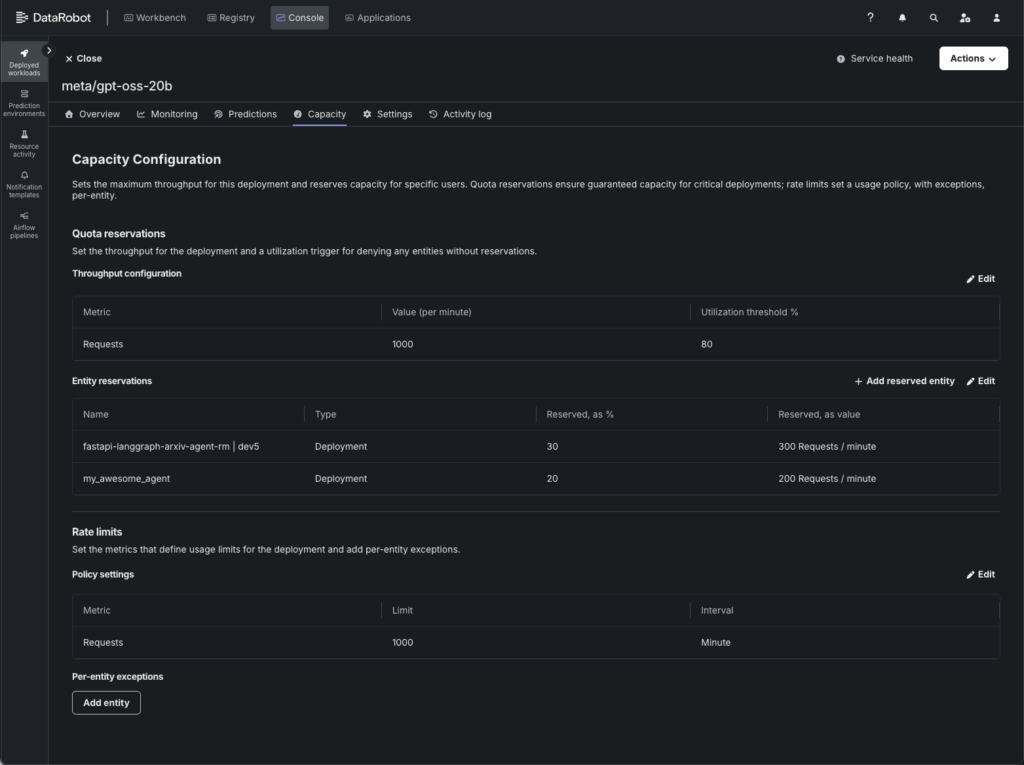
Quota reservations define the deployment’s total possible throughput (value per minute) and a utilization threshold that triggers enforcement. Within that budget, specific entities can be allocated a reserved percentage — guaranteeing them a minimum slice of capacity that other consumers can’t take away.
What it protects against: Priority starvation. Without reservations, a noisy neighbor can consume the entire capacity budget, leaving your critical workloads with nothing.
How Rate Limits and Quota Reservations work together (and apart)
Used alone, each tool solves a specific problem:
Rate limiting alone caps total throughput. Under saturation, all consumers compete equally — first come, first served.
Quota reservations alone guarantee minimum throughput for specific consumers, regardless of what others are doing.
Together, they give you both control surfaces: a ceiling that protects the model and guaranteed floors for the consumers that matter most.
Load testing a multi-tenant deployment
To evaluate these features under pressure, we load-tested a gpt-oss-20b deployment in our staging environment. The setup simulates a real multi-tenant scenario: four consumers sharing one model, each with different priority levels.
Example configuration
Setting
Value
Model
gpt-oss-20b (NVIDIA NIM)
Capacity
1000 RPM
Utilization Threshold
80% (enforcement kicks in at 800 RPM)
Consumer
Type
Reserved Capacity
Effective Guarantee
Production Agent A
Deployment
30%
300 RPM
Production Agent B
Deployment
20%
200 RPM
Production Agent C
Deployment
30%
300 RPM
Dev User (unreserved)
User
–
None — shares the 20% unreserved pool
This left a 20% unreserved pool (200 RPM) for the dev user and any overflow.
Example load profile
We ran six escalating scenarios over 17 minutes to observe behaviour at different saturation levels:
Scenario
What Happens
Combined Load
Normal traffic
All four consumers at moderate, throttled rates
~600 RPM (below utilization threshold)
Slight overload
All four consumers ramp up to just over capacity
~1,200 RPM (1.2× capacity)
Heavy overload
All four consumers fire as fast as possible
~7,200 RPM (7× capacity)
Extreme overload
Maximum concurrent workers per consumer
~12,000 RPM (12× capacity)
Late joiner
Three agents flood first, dev user joins 60s later
~9,000 RPM
Reserved-only
Three agents compete, dev user silent
~7,200 RPM
When to use Rate Limiting alone
Rate limiting by itself is the right choice when:
All consumers are equally important. If no team’s traffic is more critical than another’s, there’s no need for reservations. Equal competition under saturation is fair enough.
You just need to protect the GPU. Your primary concern is that a spike in traffic doesn’t degrade model latency or cause OOM errors. You want a safety valve, not a traffic policy.
You have a single consumer. If there’s only one application hitting the deployment, reservations are meaningless — there’s no one to reserve against.
What the example showed
During the normal traffic scenario (~600 RPM combined, well below the 800 RPM utilization threshold), the rate limiter was invisible and all four consumers achieved 100% success rates with zero rejected requests.
Scenario
Combined RPM
Success Rate
429s
Normal traffic
~600
100%
0
Size your reservations based on the absolute minimum throughput each consumer requires during peak contention. This is by design, so you’re not penalizing normal traffic.
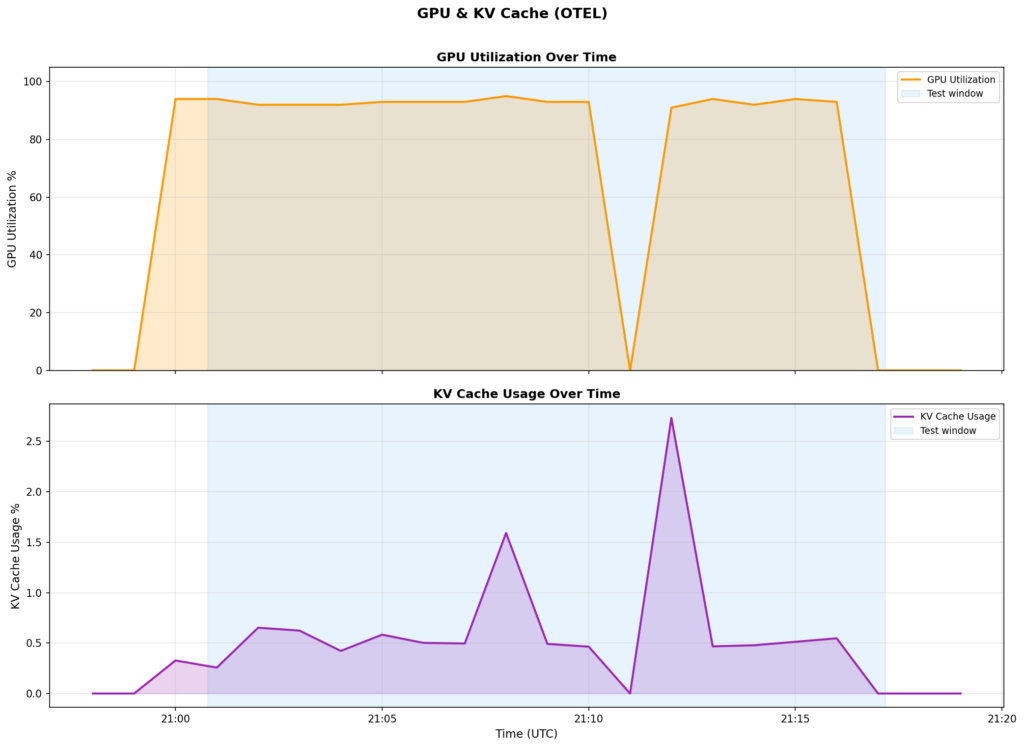
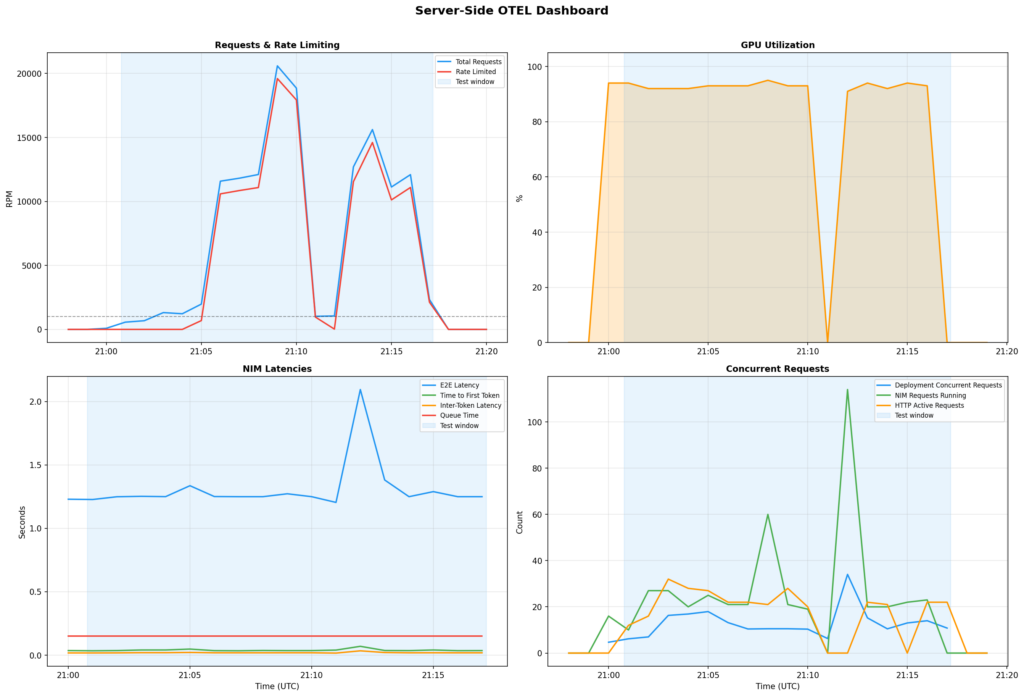
And it protects the model even under extreme abuse. During the extreme overload scenario (20,000+ RPM against 1,000 RPM capacity, which is a a 20× overload), the rate limiter rejected 95% of requests. But the model itself stayed perfectly healthy:
NIM Metric
Under 20× Overload
GPU Utilization
91–95% (stable)
E2E Latency
1.25s → 2.09s (brief spike, then stable)
Time to First Token
35ms (unchanged)
Inter-Token Latency
18ms (unchanged)
KV Cache
<3% (not stressed)
The rate limiter acted as a firewall between chaotic client demand and stable model inference. Without it, those 20,000 requests per minute would have queued up inside the NIM, latency would have ballooned, and the model would have effectively become unusable for everyone.
Takeaway: If your only goal is “don’t let traffic spikes kill the model,” rate limiting alone is sufficient and zero-config beyond setting the capacity number.
When to add Quota Reservations
Quota reservations become essential when:
Some consumers are more important than others. Your fraud detection system can’t afford to be starved out by a batch analytics job. Your production agent needs guaranteed throughput that a developer’s test harness can’t steal.
You have a multi-tenant deployment. Multiple teams, applications, or downstream deployments share the same model. Without reservations, the loudest consumer wins.
You want predictable SLAs. If you’ve promised a team “your application will get at least 300 RPM,” reservations are how you enforce that promise at the infrastructure level.
You have a mix of interactive and batch workloads. Batch jobs are bursty and will happily consume all available capacity. Reservations ensure interactive workloads still get their share during batch spikes.
How to size reservations
Size your reservations based on the absolute minimum throughput each consumer requires during peak contention.
Rules of thumb:
Don’t reserve 100%. Leave an unreserved pool (10–20%) for ad-hoc traffic, new consumers, and overflow. If you reserve everything, any new application gets zero throughput until you reconfigure.
Size reservations to minimum needs, not peak needs. Reservations guarantee a floor, not a ceiling. An entity with 30% reserved can still use more than 30% when capacity is available.
Match reservation size to business criticality, not team size. Your fraud detection system might have fewer requests than your analytics pipeline, but it needs guaranteed access more.
In our example, three production agents received 30%/20%/30% reservations, leaving a 20% unreserved pool for the dev user. This meant the dev user could still use the deployment — they just wouldn’t get guaranteed access during contention.
Do reservations work under real load?
At slight overload (1.2× capacity): The system degrades gracefully
During the slight overload scenario (~1,200 RPM against 1,000 RPM capacity), all four consumers achieved 100% success — the token bucket’s burst capacity absorbed the slight overage. This is the “graceful degradation” zone where reservations aren’t yet needed, but the system is proving it can handle bursts.
At heavy-to-extreme overload (7–12× capacity): reservations maintain a guaranteed floor
When all four consumers fired as fast as possible (7,000–12,000 RPM against a 1,000 RPM capacity), the system was overwhelmed. Here’s what each consumer experienced across the full test:
Consumer
Reserved
Success Rate
Successful Requests
Production Agent A
30%
29.0%
4,172
Production Agent B
20%
30.2%
4,332
Production Agent C
30%
28.9%
4,176
Dev User (unreserved)
–
28.9%
2,828
Why the success rates look similar: At 12× overload, even a 300 RPM reservation is only ~2.5% of what each consumer is attempting to send (~3,000 RPM per consumer vs. a 300 RPM guarantee). The reservation works by ensuring each consumer receives its guaranteed 200–300 RPM. However, because 97% of total traffic is rejected during extreme overloads, the relative percentage differences compress.
The more revealing metric is absolute throughput. Reserved consumers completed 4,172–4,332 successful requests. The unreserved dev user completed 2,828 — about 34% fewer. Even accounting for the dev user’s shorter active time, reserved consumers consistently got more requests through during shared scenarios.
At saturation with a late joiner: reservations protect incumbents
In the late joiner scenario, the three production agents were already flooding the system when the dev user joined 60 seconds later. With all reserved capacity spoken for, the dev user was confined to the 20% unreserved pool (~200 RPM). The production agents continued drawing from their guaranteed buckets, unaffected by the new arrival.
This is the scenario that matters most in production. A batch job kicks off, or a new application goes live, and suddenly there’s more demand than supply. Without reservations, the new load pushes everyone’s throughput down equally. With reservations, your critical consumers are shielded.
Reserved consumers compete fairly among themselves
In the reserved-only scenario, the dev user went silent and only the three production agents competed. Their success rates were nearly identical (28.9%–30.2%) — the system divided throughput proportionally across their reservations.
What the server sees: OTEL metrics tell the story
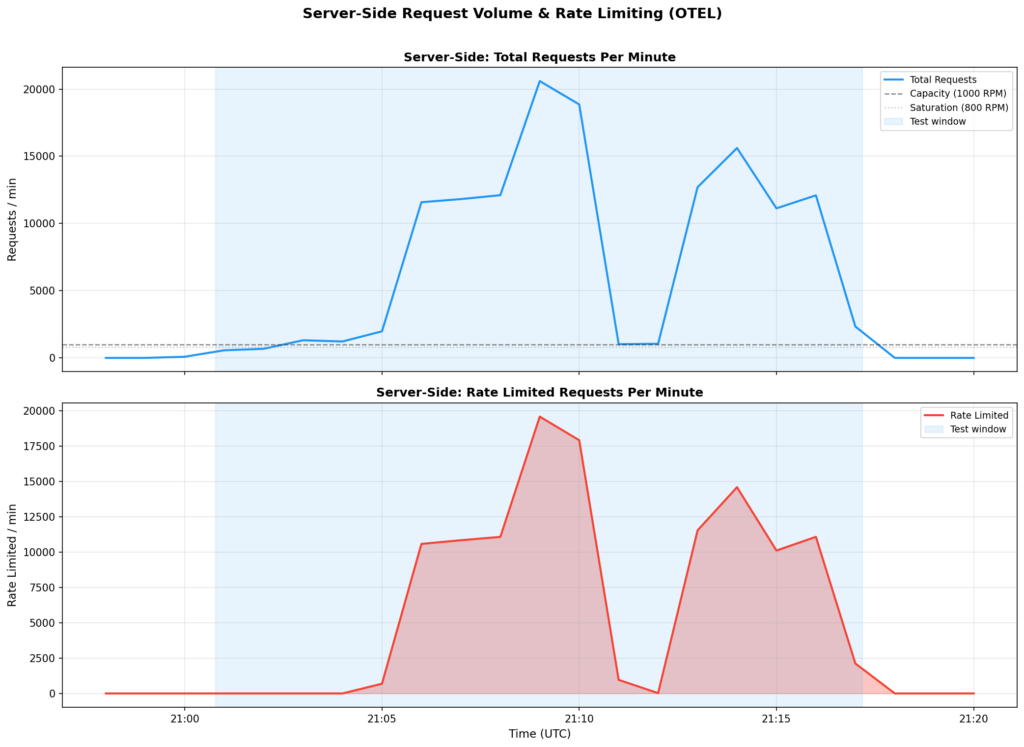
Client-side metrics (success rates, 429 counts) tell you what your consumers experienced. Server-side OTEL metrics tell you what the platform experienced. Here’s what our example deployment looked like from the inside.
The rate limiter protects model health
During peak load (20,596 requests/minute hitting the endpoint), the NIM was serving only the ~1,000 RPM that the rate limiter let through:
What the endpoint saw
What the NIM saw
20,596 requests/min
~1,000 requests/min (served)
19,603 rate-limited/min
18–22 concurrent requests
—
1.25s E2E latency (stable)
—
91–95% GPU utilization (healthy)
Without rate limiting, those 20,000 RPM would have queued inside the NIM. The GPU wouldn’t have gotten more productive — it’s already at 91–95% — but latency would have spiraled as requests stacked up. Instead, the rate limiter rejected excess requests immediately (at 429-response speeds, not inference speeds), keeping the model responsive for the traffic it did accept.
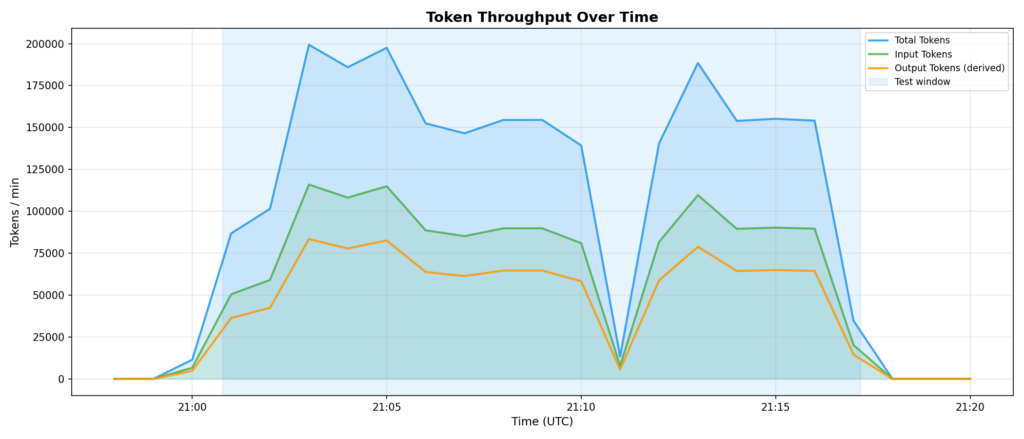
Token throughput follows successful requests
Peak token throughput was ~199,350 tokens/min (total), with ~115,939 input and ~83,411 output. These numbers track directly with the rate limiter’s allowed throughput — not with the attempted request volume. Another way of seeing that the rate limiter is correctly shaping traffic.
Deciding between Rate Limits and Quota Reservations
Use this flowchart to decide what to configure:
Step 1: Do you have a shared deployment with multiple consumers?
No → Rate limiting alone is sufficient. Set capacity to protect the GPU and move on.
Yes → Continue to Step 2.
Step 2: Are all consumers equally important?
Yes → Rate limiting alone may be enough. Under saturation, all consumers compete equally — first come, first served. If that’s acceptable, stop here.
No → Continue to Step 3.
Step 3: Do any consumers need guaranteed minimum throughput?
Yes → Add quota reservations. Size them to the minimum RPM each critical consumer needs during peak contention.
No, but some consumers need to be deprioritized → Use per-entity exceptions instead of reservations. Cap the noisy neighbors rather than guaranteeing the critical ones.
Step 4: Configure the unreserved pool.
Don’t reserve 100% of capacity. Leave 10–20% unreserved for ad-hoc traffic, overflow, and new applications that haven’t been assigned reservations yet.
Practical configuration tips
Start with rate limiting only. Monitor your deployment’s traffic patterns for a week. Look at peak RPM, who’s sending what, and whether anyone is consistently overconsuming. Then add reservations where the data tells you they’re needed.
Set utilization threshold at 70–80%. This gives the token bucket burst room to absorb short spikes without triggering rate limiting on every minor fluctuation. In our example, we used 80% and the system handled 1.2× capacity gracefully before enforcement kicked in.
Monitor with OTEL metrics. After configuring rate limiting, check these server-side metrics to confirm things are working:
deployment.requests vs deployment.requests.rate_limited — are you rejecting the right amount?
nvidia_gpu_utilization — is the model still saturated or did rate limiting create headroom?
nvidia_vllm:e2e_request_latency_seconds — is latency stable under load?
deployment.concurrent_requests — are requests queuing up or flowing smoothly?
Reservation sizing formula:
Reserved RPM = Capacity × Reserved %
Example: 1000 RPM × 30% = 300 RPM guaranteed
Don’t confuse this with a rate limit. A 30% reservation means “you’ll always get at least 300 RPM, even when the system is saturated.” The entity can still use more when capacity is available.
Soft robotics—machines made of flexible, muscle-like materials—can bend and stretch in fluid ways that put the rigid robots of old sci-fi movies to shame. But the flexibility that lets them pick ripe tomatoes or navigate a search-and-rescue site comes at a cost: Soft robotics are notoriously difficult to control.
Over the past few decades, roboticists worldwide have introduced increasingly advanced robots that can understand human instructions, move in their surroundings and reliably complete basic manual tasks. While they perform well in some scenarios, many of these robots still struggle to translate the instructions of users into precise and executable actions that would allow them to successfully complete desired tasks.
Autonomous robots can perform tasks with limited human intervention, while Physical AI gives machines the ability to understand their environment, make decisions, and interact with the physical world more effectively.