To reliably complete various manual tasks, robots should be able to handle a variety of objects, ranging from items found in households to tools used in specific professional settings. While many existing robotic systems can now complete basic manual tasks, such as picking up objects and carrying them to a set location, most systems still struggle with tasks that entail the dexterous manipulation of objects.
Integrating a high-performance Thermal Imaging Module is more than a sensor upgrade. It is a strategic engineering choice that tackles key industrial automation challenges, including unexpected downtime, fire risks and environmental limitations.
Why Your Clinical Operations Teams Are Always Behind (And What AI Does About It)?
It is Thursday afternoon. Your clinical operations coordinator has been in the data since 9 AM. A prior authorization status changed Tuesday. Patient volume shifted Wednesday. The throughput report you need for the Friday leadership review is not going to reflect either of those things.
This is a data latency problem. And it is happening in clinical operations teams everywhere.
USM Business Systems works with mid-market health systems, specialty pharmacy operators, and pharma/CRO organizations to build AI-powered clinical operations visibility systems. What we see consistently: the gap is not how skilled the team is. The gap is how fast the data gets to them.
Why Clinical Operations Teams Are Always One Step Behind?
Most clinical operations teams work from snapshots. They pull from the EHR. They check the prior auth queue. They reconcile payer status updates from fax confirmations and portal logins. They build the picture manually, then brief leadership off that picture.
By the time the picture is complete, it reflects what happened three days ago.
When a payer changes authorization criteria, patient census spikes, or a specialty drug hits a procurement delay, the first signal is often a missed commitment or a denied claim, not a dashboard alert.
The teams with the best clinical outcomes and the strongest revenue cycle performance are the ones with the fastest signal-to-decision cycle.
The organizations closing that gap are building continuous signal coverage into the operation itself.
What AI Actually Changes in Clinical Operations?
AI does not replace clinical judgment. What it eliminates is the manual work that sits between the data and the judgment.
Here is what that looks like in practice:
Prior authorization statuses update automatically when payer portals or EDI transactions confirm decisions, without a coordinator manually checking five payer portals each morning
Pharmacy intake processing runs on live prescription data and formulary signals, not the last batch pull from overnight
Denial risk flags surface in the morning standup, before the claim goes out and generates a write-off
Scenario modeling on patient volume changes or formulary shifts takes minutes, not the next planning cycle
The operations leader does not spend Wednesday building the Thursday report. The report is already built. They spend Wednesday making decisions.
The Build vs. Buy Question
Off-the-shelf healthcare operations platforms make assumptions about your EHR configuration, your payer mix, and your workflow architecture that often do not match reality. A mid-market health system running two EHRs from a merger and a prior auth workflow that still routes through fax is not going to get clean output from a platform built for median-case infrastructure.
A custom-built clinical operations AI agent is trained on your actual data schema, your payer relationships, your authorization criteria and denial patterns. It knows what your operation looks like, not what the average operation looks like.
The build timeline is typically 8–12 weeks for an initial deployment. The ROI window, based on the engagements USM has completed, is 6–12 months, after which the system operates at a fraction of the cost of the coordinator hours it replaces or augments.
What the Transition Looks Like?
For most clinical operations teams, the starting point is one problem they already know they have.
Prior auth backlogs that do not reflect actual payer decisions. Pharmacy intake processing that is always 24 hours behind the prescription. Denial trends that surface after the write-off instead of before the claim.
Pick one of those. Build the agent around it. Measure the time and decision quality improvement. Then expand.
That is the architecture USM – AI app development company, uses with every healthcare operations engagement. Scoped in two weeks. Built in 8–12. Measured from day one.
It does not take much to confuse some robots. A machine might be great at handling a simple object like a box, yet when it tries to work with a more irregular shape like a banana, it often fails.
Researchers at the Intelligent Biomimetic Design Lab at Peking University have developed a bio-signal framework showing that fish muscles do far more than generate swimming motion. In a series of studies led by Xie Guangming, Professor at the School of Advanced Manufacturing and Robotics, and carried out by twin brothers Waqar Hussain Afridi and Rahdar Hussain Afridi, muscle electrical signals were used to reconstruct body posture, infer surrounding flow conditions, and transfer biological principles to robotic systems. These findings open new directions in biological telemetry, locomotion research, and bio-inspired underwater robotics.
Since humanoids are most viable in environments where they can adapt to human-designed workflows without requiring extensive infrastructure changes. Still, successful deployment will hinge on meeting a set of practical operational constraints.
Ideally, that means you’ll be able to engage in multi-step edits in Word — and engage in multi-step uses of other apps like Excel and PowerPoint — from the get-go.
The downside: AI agents are not perfect, make mistakes – and according to a new Stanford study, are only 66% reliable.
Observes writer Igor Bonifacic: “OpenAI describes the new system as a ‘step change’ for image generation models, particularly when it comes to the tool’s ability to follow instructions in detail, render dense text and place and relate objects in a scene.”
It’s also even available to users of free ChatGPT – although users on paid tiers get access to more advanced outputs with the tool, according to Bonifacic.
Observes writer Eric Hal Schwartz: “Users asking the AI for help should be able to get what they want with much less back-and-forth refinement of their prompts.”
The system is expected to understand the intent of a request immediately — which should improve the reliability of how ChatGPT handles those tasks, according to Schwartz.
Instead, everyone else is cruising along on free AI.
That kind of stat can be stupefying to people who use higher-end AI throughout the day – at $20/month — to generally solve every major or minor challenge that comes their way.
Things may change in coming years if the big AI providers decide to scale back on lower-end – and not nearly as bright – free AI and start asking more users to pay up.
Observes writer Sarah Perez: “According to Google, this will allow Gmail users to ask questions in search using natural language — and then get concise answers without having to open and read different emails.”
Google says the AI Overviews in Gmail will be the default setting if you have Gemini for Workspace in Gmail enabled, or if your Workspace Intelligence access to Gmail is enabled, Perez adds.
Observes writer AJ Dellinger: “The company recently sent a memo to employees informing them of new tracking software that will be installed on their computers to track mouse movements and keystrokes in order to help train AI agents to perform specific work tasks.”
In a perfect world, it sure would be nice if mere fleshbag employees received bonuses for training their replacements.
But apparently, all that “AI Abundance” Silicon Valley has been gushing over will stay in the wallets of the AI titans after all.
Surprise, surprise.
Fortunately, Meta can use an already existing theme-song that’s custom-made for their new initiative — courtesy of the The Police.
Specifically, SelfPublishing.pro promises to consolidate pre-publishing services, including editing and formatting, distribution to major retailers, marketing campaign execution and royalty reporting into a unified platform where authors manage projects, communicate with the team, and track sales from a single dashboard.
With more than $600 billion targeted for investment during 2026, the dollars are headed toward high-performance chips, massive data centers and scores of additional networks, data storage and advanced cooling systems.
New powerhouse AI software from Anthropic has uncovered 271 security holes in the extremely popular browser, Firefox.
Full credit must be given to the maker of Firefox – Mozilla – which used Mythos to uncover the security problems and was completely transparent about the results.
Observes Bobby Holley, CTO, Mozilla: “Computers were completely incapable of doing this a few months ago — and now they excel at it.”
*AI Big Picture: Get Ready for a Slew of Software Security Patches: Wall Street Journal writer Nicole Nguyen advises that with the advent of powerful new AI programs like Anthropic Mythos – which can uncover security holes in software with alarming efficiency – we all need to triple-down on keeping up with security software patches.
Observes Nguyen: “Anthropic’s newest, as-yet-unreleased (to the general public) AI model is a hacker’s dream.”
Indeed, Mythos has apparently found thousands of high-severity vulnerabilities in every major operating system and Web browser, according to Nguyen.
Share a Link: Please consider sharing a link to https://RobotWritersAI.com from your blog, social media post, publication or emails. More links leading to RobotWritersAI.com helps everyone interested in AI-generated writing.
–Joe Dysart is editor of RobotWritersAI.com and a tech journalist with 20+ years experience. His work has appeared in 150+ publications, including The New York Times and the Financial Times of London.
Claire chatted to Chenying Liu from University of Oxford about how a robot’s physical form can actively contribute to sensing, processing, decision-making, and movement.
Chenying Liu is a Junior Research Fellow and an Associate Member of Faculty in the Department of Engineering Science at the University of Oxford. She leads an independent research programme focused on embodied physical intelligence, exploring how robot design can integrate geometry, materials, and control to enhance autonomy and robustness. Her work aims to develop more efficient and resilient robotic systems by embedding intelligence directly into their physical structures.
Your agents are only as good as the knowledge they can access — and only as safe as the permissions they enforce.
We’re launching ACL Hydration (access control list hydration) to secure knowledge workflows in the DataRobot Agent Workforce Platform: a unified framework for ingesting unstructured enterprise content, preserving source-system access controls, and enforcing those permissions at query time — so your agents retrieve the right information for the right user, every time.
The problem: enterprise knowledge without enterprise security
Every organization building agentic AI runs into the same wall. Your agents need access to knowledge locked inside SharePoint, Google Drive, Confluence, Jira, Slack, and dozens of other systems. But connecting to those systems is only half the challenge. The harder problem is ensuring that when an agent retrieves a document to answer a question, it respects the same permissions that govern who can see that document in the source system.
Today, most RAG implementations ignore this entirely. Documents get chunked, embedded, and stored in a vector database with no record of who was — or wasn’t — supposed to access them. This can result in a system where a junior analyst’s query surfaces board-level financial documents, or where a contractor’s agent retrieves HR files meant only for internal leadership. The challenge isn’t just how to propagate permissions from the data sources during the population of the RAG system — those permissions need to be continuously refreshed as people are added to or removed from access groups. This is critical to keep synchronized controls over who can access various types of source content.
This isn’t a theoretical risk. It’s the reason security teams block GenAI rollouts, compliance officers hesitate to sign off, and promising agent pilots stall before reaching production. Enterprise customers have been explicit: without access-control-aware retrieval, agentic AI can’t move beyond sandboxed experiments.
Existing solutions don’t solve this well. Some can enforce permissions — but only within their own ecosystems. Others support connectors across platforms but lack native agent workflow integration. Vertical applications are restricted to internal search without platform extensibility. None of these options give enterprises what they actually need: a cross-platform, ACL-aware knowledge layer purpose-built for agentic AI.
What DataRobot provides
DataRobot’s secure knowledge workflows provide three foundational, interlinked capabilities in the Agent Workforce Platform for secure knowledge and context management.
1. Enterprise data connectors for unstructured content
Connect to the systems where your organization’s knowledge actually lives. At launch, we’re providing production-grade connectors for SharePoint, Google Drive, Confluence, Jira, OneDrive, and Box — with Slack, GitHub, Salesforce, ServiceNow, Dropbox, Microsoft Teams, Gmail, and Outlook following in subsequent releases.
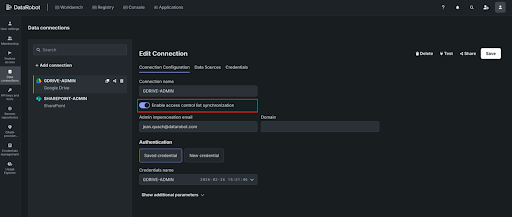
Each connector supports full historical backfill for initial ingestion and scheduled incremental syncs to keep your vector databases current. You control access and manage connections through APIs or the DataRobot UI.
These aren’t lightweight integrations. They’re built to handle production-scale workloads — 100GB+ of unstructured data — with robust error handling, retries, and sync status monitoring.
2. ACL Hydration and metadata preservation
This is the core differentiator. When DataRobot ingests documents from a source system, it doesn’t just extract content — it captures and preserves the access control metadata (ACLs) that define who can see each document. User permissions, group memberships, role assignments — all of it is propagated to the vector database lookup so that retrieval is aware of the permissioning on the data being retrieved.
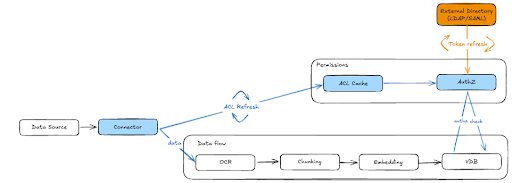
Here’s how it works (also illustrated in Figure 1 below):
During ingestion, document-level ACL metadata — including user, group, and role permissions — is extracted from the source system and persisted alongside the vectorized content.
ACLs are stored in a centralized cache, decoupled from the vector database itself. This is a critical architectural decision: when permissions change in the source system, we update the ACL cache without reindexing the entire VDB. Permission changes propagate to all downstream consumers automatically. This includes permissioning for locally uploaded files, which respect DataRobot RBAC.
Near real-time ACL refresh keeps the system in sync with source permissions. DataRobot continuously polls and refreshes ACLs within minutes. When someone’s access is revoked in SharePoint or a Google Drive folder is restructured, those changes are reflected in DataRobot on a scheduled basis — ensuring your agents never serve stale permissions.
External identity resolution maps users and groups from your enterprise directory (via LDAP/SAML) to the ACL metadata, so permission checks resolve correctly regardless of how identities are represented across different source systems.
3. Dynamic permission enforcement at query time
Storing ACLs is necessary but not sufficient. The real work happens at retrieval time.
When an agent queries the vector database on behalf of a user, DataRobot’s authorization layer evaluates the stored ACL metadata against the requesting user’s identity, group memberships, and roles — in real time. Only embeddings the user is authorized to access are returned. Everything else is filtered before it ever reaches the LLM.
This means two users can ask the same agent the same question and receive different answers — not because the agent is inconsistent, but because it’s correctly scoping its knowledge to what each user is permitted to see.
For documents ingested without external ACLs (such as locally uploaded files), DataRobot’s internal authorization system (AuthZ) handles access control, ensuring consistent permission enforcement regardless of how content enters the platform.
How it works: step by step
Step 1: Connect your data sources
Register your enterprise data sources in DataRobot. Authenticate via OAuth, SAML, or service accounts depending on the source system. Configure what to ingest — specific folders, file types, metadata filters. DataRobot handles the initial backfill of historical content.
Step 2: Ingest content with ACL metadata
As documents are ingested, DataRobot extracts content for chunking and embedding while simultaneously capturing document-level ACL metadata from the source system. This metadata — including user permissions, group memberships, and role assignments — is stored in a centralized ACL cache.
The content flows through the standard RAG pipeline: OCR (if needed), chunking, embedding, and storage in your vector database of choice — whether DataRobot’s built-in FAISS-based solution or your own Elastic, Pinecone, or Milvus instance — with the ACLs following the data throughout the workflow.
Step 3: Map external identities
DataRobot resolves user and group information. This mapping ensures that ACL permissions from source systems — which may use different identity representations — can be accurately evaluated against the user making a query.
Group memberships, including external groups like Google Groups, are resolved and cached to support fast permission checks at retrieval time.
Step 4: Query with permission enforcement
When an agent or application queries the vector database, DataRobot’s AuthZ layer intercepts the request and evaluates it against the ACL cache. The system checks the requesting user’s identity and group memberships against the stored permissions for each candidate embedding.
Only authorized content is returned to the LLM for response generation. Unauthorized embeddings are filtered silently — the agent responds as if the restricted content doesn’t exist, preventing any information leakage.
Step 5: Monitor, audit, and govern
Every connector change, sync event, and ACL modification is logged for auditability. Administrators can track who connected which data sources, what data was ingested, and what permissions were applied — providing full data lineage and compliance traceability.
Permission changes in source systems are propagated through scheduled ACL refreshes, and all downstream consumers — across all VDBs built from that source — are automatically updated.
Why this matters for your agents
Secure knowledge workflows change what’s possible with agentic AI in the enterprise.
Agents get the context they need without compromising security. By propagating ACLs, agents have the context information they need to get the job done, while ensuring the data accessed by agents and end users honors the authentication and authorization privileges maintained in the enterprise. An agent doesn’t become a backdoor to enterprise information — while still having all the enterprise context needed to do its job.
Security teams can approve production deployments. With source-system permissions enforced end-to-end, the risk of unauthorized data exposure through GenAI isn’t just mitigated — it’s eliminated. Every retrieval respects the same access boundaries that govern the source system.
Builders can move faster. Instead of building custom permission logic for every data source, builders get ACL-aware retrieval out of the box. Connect a source, ingest the content, and the permissions come with it. This removes weeks of custom security engineering from every agent project.
End users can trust the system. When users know that the agent only surfaces information they’re authorized to see, adoption accelerates. Trust isn’t a feature you bolt on — it’s the result of an architecture that enforces permissions by design.
Get started
Secure knowledge workflows are available now in the DataRobot Agent Workforce Platform. If you’re building agents that need to reason over enterprise data — and you need those agents to respect who can see what — this is the capability that makes it possible. Try DataRobot or request a demo.
Operations underground, for example in underground stations, tunnels or mines, are risky and difficult for rescue teams. This is especially true if the technical infrastructure has collapsed due to explosions or fire, and there are no mobile phone signals, electricity, light, Wi-Fi or GNSS, while smoke, debris and damaged paths make orientation even more difficult.
When a knot lets go, it doesn't just fall apart. It snaps. That simple observation led Penn Engineers to rethink what a knot can do. Instead of treating it as something that holds tension, they asked a different question: what happens when you design a knot to release it? The answer is a tiny, soft robot capable of leaping meters into the air, flipping mid-flight, spinning like a propeller or even gliding back to where it started.
Physicists have taken a major step toward using AI not just to analyze data, but to uncover entirely new laws of nature. By combining a specially designed neural network with precise 3D tracking of particles in a dusty plasma—a strange “fourth state of matter” found from space to wildfires—the team revealed hidden patterns in how particles interact. Their model captured complex, one-way (non-reciprocal) forces with over 99% accuracy and even overturned long-held assumptions about how these forces behave.
Building AI systems that reliably manipulate objects in unstructured environments may be comparable in complexity to autonomous driving, a field that has absorbed over $100 billion in investment over the past fifteen years and is still not fully solved.